
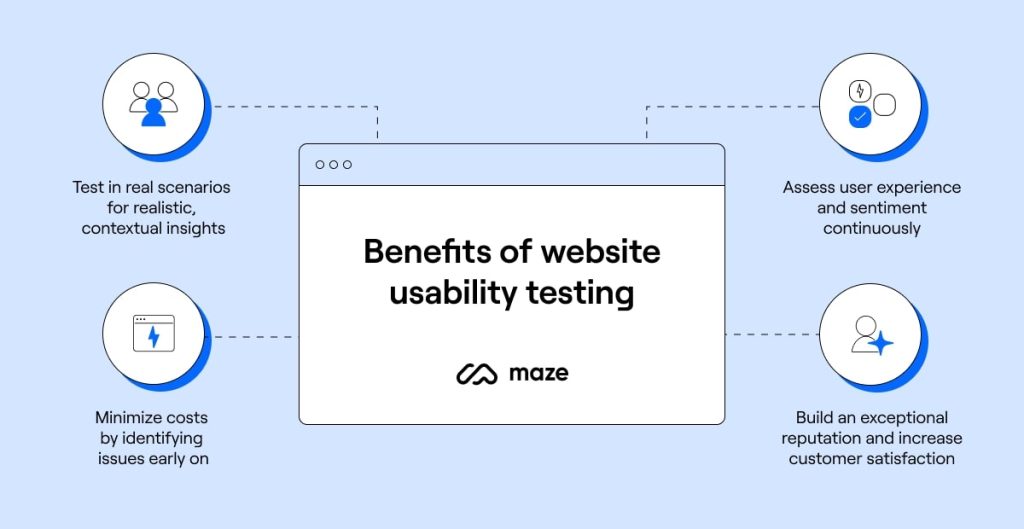
Website Usability Testing evaluates how easy and efficient a website is for users. It identifies issues and areas for improvement.
Usability testing is crucial for creating a user-friendly website. It ensures visitors can navigate effortlessly and achieve their goals. This process involves real users performing tasks to uncover design flaws and usability issues. By gathering feedback, developers can make informed decisions to enhance the website.
Effective usability testing improves user satisfaction, reduces bounce rates, and increases conversions. It also helps in understanding user behavior, which is vital for continuous improvement. Regular testing keeps the website aligned with user expectations and industry standards. Invest in usability testing to create a seamless and engaging user experience.
Introduction To Website Usability
Website usability is a key factor in a website’s success. It refers to how easily users can navigate and interact with a website. Good usability ensures users can find what they need quickly and efficiently. In this section, we’ll dive into the importance of usability and its impact on user experience.
Importance Of Usability
Usability is crucial for a website’s effectiveness. A well-designed site allows users to complete tasks without frustration. This leads to higher satisfaction and increased engagement.
- Increased User Satisfaction: Users enjoy sites that are easy to navigate.
- Higher Engagement: Visitors stay longer on user-friendly websites.
- Better Conversion Rates: Easy-to-use sites lead to more sales or sign-ups.
Good usability also reduces the need for customer support. Users can find answers on their own, saving time and resources. Investing in usability testing can significantly improve a website’s performance.
Impact On User Experience
User experience (UX) is directly affected by usability. A positive UX keeps users coming back. Negative experiences drive users away.
Consider these key aspects:
- Navigation: Users should find what they need in a few clicks.
- Loading Speed: Fast-loading pages enhance user satisfaction.
- Mobile-Friendliness: Sites should work well on all devices.
Usability impacts SEO rankings. Search engines prefer user-friendly websites. This leads to better visibility and more organic traffic. Improving usability is essential for both user experience and SEO.

Credit: www.hotjar.com
Key Elements Of Usability Testing
Understanding the key elements of usability testing is essential for improving your website. Usability testing ensures your site is user-friendly and efficient. Let’s explore the fundamental aspects.
Navigation And Structure
Effective navigation and structure are crucial for a website’s success. Users should find information quickly and easily. Test if your menu is clear and intuitive. Ensure links are working and direct users to the right pages.
- Simple and logical menu layout
- Consistent navigation across all pages
- Clear call-to-action buttons
- Accessible search functionality
Consider using a site map to help users. A well-structured site map improves user experience. Test the site map for completeness and ease of use.
Content And Readability
Content must be easy to read and understand. Use simple language. Short sentences work best. Break text into small paragraphs. Include bullet points for clarity.
| Element | Best Practice |
|---|---|
| Headings | Use descriptive and concise headings |
| Paragraphs | Keep paragraphs short and focused |
| Font | Choose a readable font size and style |
Ensure your content is scannable. Most users scan rather than read. Use bold text to highlight key points. Check for grammatical errors and typos. Proper grammar enhances readability.
Tools For Usability Testing
Understanding website usability is crucial for user satisfaction. Usability testing tools help identify areas for improvement. These tools can be automated or manual. Each type has unique benefits. Let’s explore them in detail.
Automated Tools
Automated tools streamline the usability testing process. They save time and provide quick feedback.
- Google Analytics: Tracks user behavior and highlights problem areas.
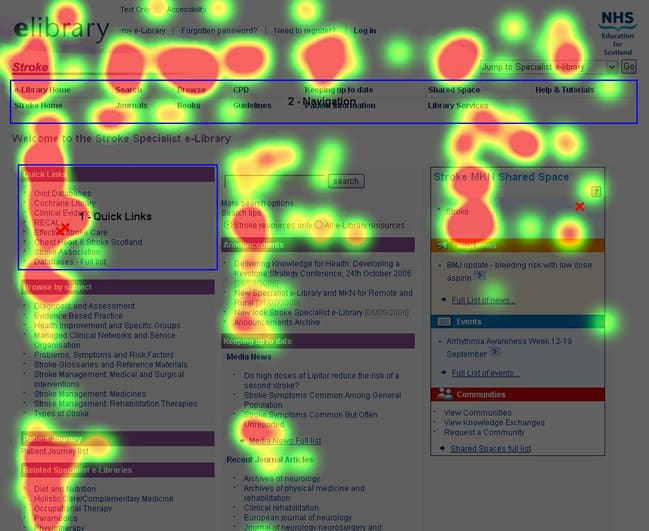
- Hotjar: Offers heatmaps, session recordings, and feedback polls.
- Crazy Egg: Visualizes user interactions with heatmaps and scroll maps.
- Optimizely: Facilitates A/B testing to compare different versions of a page.
Automated tools are effective for large-scale testing. They offer quantitative data. This data helps in making informed decisions. These tools are essential for continuous improvement.
Manual Testing Methods
Manual testing methods involve human evaluators. These methods provide qualitative insights.
- User Interviews: Direct feedback from users about their experience.
- Usability Testing Sessions: Observing users as they navigate the site.
- Surveys and Questionnaires: Collecting detailed user opinions and suggestions.
- Expert Reviews: Usability experts evaluate the site based on best practices.
Manual methods are great for understanding user emotions. They reveal the why behind user actions. These methods are invaluable for creating user-centric designs.
Both automated and manual tools are critical. They offer unique insights into usability. Combining both gives a comprehensive understanding of user experience. Use these tools to enhance your website’s usability and user satisfaction.
Credit: usabilitygeek.com
Conducting Usability Tests
Conducting usability tests is essential for understanding user experience. These tests help identify issues and improve website functionality. The process involves several key steps. Each step ensures you gather valuable insights from real users.
Planning The Test
Planning is the first step in conducting usability tests. Start by defining clear objectives. What do you want to learn from the test? Outline the tasks users will perform. These tasks should reflect common user goals. Create a script to guide the test session. This ensures consistency across different sessions.
Choose the right tools for recording and analyzing data. Consider using screen recording software. This captures user interactions and provides visual feedback. Prepare a checklist of necessary equipment. This includes cameras, microphones, and any other tools you need.
Recruiting Participants
Recruiting participants is a crucial step. Aim for a diverse group of users. This provides varied perspectives on your website. Create a profile for ideal participants. Include details like age, tech skills, and interests.
Use different methods to find participants. You can use social media, email lists, or user panels. Offer incentives to encourage participation. This could be a small payment or a gift card. Schedule the sessions at convenient times for participants.
| Step | Action |
|---|---|
| 1 | Define objectives |
| 2 | Outline tasks |
| 3 | Create a script |
| 4 | Choose tools |
| 5 | Prepare equipment |
Usability testing is a powerful tool for website improvement. Follow these steps for effective results.
Analyzing Usability Test Results
Analyzing usability test results is crucial for improving website functionality. This analysis helps identify user pain points and understand their behavior better. Effective analysis can transform your website into a user-friendly platform.
Identifying Pain Points
To start, identify the pain points users experience. Pay attention to where users struggle. Look for common frustrations and roadblocks. Use a table to organize these pain points for clarity:
| Pain Point | Description | Frequency |
|---|---|---|
| Navigation Issues | Users can’t find what they need | High |
| Slow Load Times | Pages take too long to load | Medium |
| Complex Forms | Forms are too hard to fill out | Low |
This table helps prioritize which issues to address first. Fixing these pain points can significantly enhance user experience.
Understanding User Behavior
Understanding user behavior is essential. Observe how users interact with your site. Note the paths they take and actions they perform. Use bullet points to summarize key behaviors:
- Users often click on the search bar first.
- Most users scroll down to find information.
- Few users navigate through the menu.
These insights reveal how users experience your site. They help in making informed design decisions. Use this information to create a more intuitive and engaging website.
By focusing on pain points and user behavior, you can significantly improve your website’s usability.

Credit: www.intechnic.com
Implementing Improvements
After conducting thorough website usability testing, the next step is implementing improvements. This step is crucial for enhancing user experience. It ensures that your website becomes more user-friendly and efficient.
Prioritizing Changes
Not all changes are created equal. Some improvements have a higher impact on user experience. It’s essential to identify and prioritize these changes.
- List all the issues discovered.
- Rank them based on severity and frequency.
- Focus on critical issues first.
Consider using a table to organize and prioritize improvements:
| Issue | Severity | Frequency | Priority |
|---|---|---|---|
| Broken links | High | Often | 1 |
| Slow page load | Medium | Sometimes | 2 |
| Complex navigation | Low | Rarely | 3 |
Monitoring Impact
Once changes are implemented, monitor their impact. This helps in understanding the effectiveness of the improvements.
- Track user behavior using analytics tools.
- Gather feedback from real users.
- Compare metrics before and after changes.
Keep an eye on key performance indicators (KPIs) such as:
- Bounce rate
- Conversion rate
- Time spent on page
Regular monitoring ensures that the website remains user-friendly. It also helps in identifying new areas for improvement.
Case Studies Of Successful Usability Improvements
Website usability testing helps identify and fix user experience issues. Here are some case studies showcasing successful usability improvements.
E-commerce Websites
E-commerce websites benefit greatly from usability testing. A well-known online store saw a 20% increase in sales after usability improvements.
| Issue | Solution | Result |
|---|---|---|
| Confusing navigation | Streamlined menu | Better user flow |
| Slow checkout process | One-page checkout | Faster transactions |
| Unclear product descriptions | Detailed descriptions | Fewer returns |
These changes reduced cart abandonment and increased customer satisfaction. Simple adjustments can make a big difference in user experience.
Educational Platforms
Educational platforms also need usability testing. One popular platform saw a 30% increase in course completion rates after improvements.
- Complex registration process simplified
- Clearer instructions for assignments
- Intuitive dashboard design
These changes made the platform user-friendly. Students found it easier to navigate and complete their courses.
User feedback was crucial in identifying these issues. Usability testing is essential for improving educational platforms.
Future Trends In Usability Testing
Website usability testing is evolving rapidly. New technologies are shaping its future. These trends promise to enhance user experiences significantly.
Ai And Machine Learning
AI and machine learning are revolutionizing usability testing. They provide deeper insights into user behavior.
Here are some key benefits:
- Automated analysis of user interactions
- Personalized user experience recommendations
- Real-time data processing
AI tools can identify patterns quickly. This allows for faster improvements to website designs.
Machine learning can predict user actions. This helps in creating more intuitive interfaces.
Virtual Reality Usability
Virtual Reality (VR) usability is an emerging trend. It offers immersive testing environments.
Key advantages include:
- Realistic user scenarios
- Enhanced user engagement
- Detailed feedback on user interactions
VR can simulate real-world usage. This provides valuable insights into user behavior.
It also allows testers to observe users in a controlled environment. This can lead to more accurate results.
Frequently Asked Questions
What Is Website Usability Testing?
Website usability testing evaluates how easy and user-friendly a website is. It involves observing real users as they navigate the site to identify any issues and improve the overall user experience.
Why Is Usability Testing Important?
Usability testing is crucial for enhancing user satisfaction. It helps identify design flaws, ensures seamless navigation, and improves overall website performance, leading to higher user retention and conversions.
How Do You Perform Usability Testing?
Usability testing involves selecting real users, giving them tasks to complete, and observing their interactions. Tools like heatmaps and session recordings can also be used to gather insights.
What Tools Are Best For Usability Testing?
Popular tools for usability testing include UserTesting, Hotjar, and Crazy Egg. These tools help gather user feedback, track interactions, and provide valuable insights for improving website usability.
Conclusion
Usability testing is vital for your website’s success. It helps identify and fix user experience issues. By investing time in testing, you ensure a seamless, user-friendly site. Happy users lead to higher engagement and conversions. Start your usability testing journey today and watch your website thrive.