
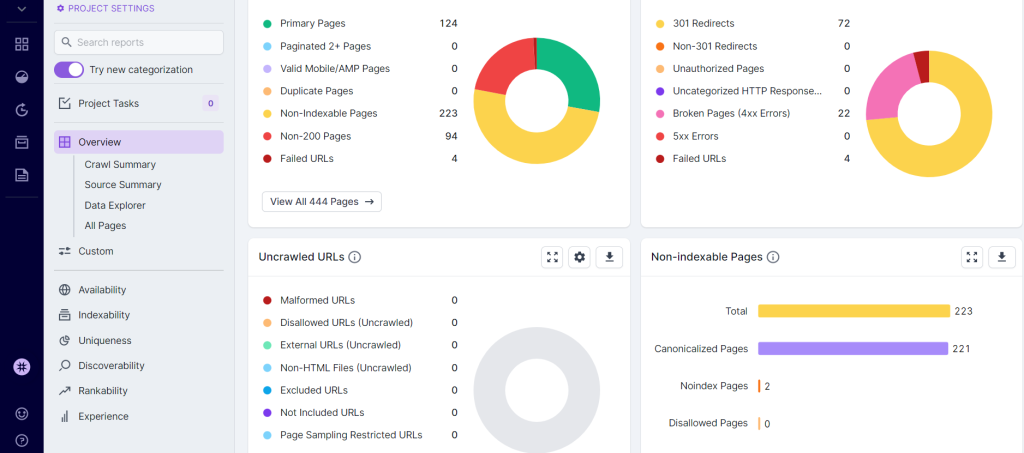
Deepcrawl is a robust technical SEO tool that helps identify website issues. It provides actionable insights to improve site performance.
Deepcrawl offers a comprehensive solution for webmasters and SEO professionals. It identifies and fixes technical issues that affect search engine rankings. The tool crawls websites to pinpoint broken links, duplicate content, and performance bottlenecks. Its user-friendly dashboard makes understanding complex SEO data simple.
Businesses can use Deepcrawl to enhance site visibility and user experience. Regular audits help maintain optimal site health. With its advanced features, Deepcrawl ensures websites meet search engine standards. This leads to higher rankings and more organic traffic. Effective use of Deepcrawl can significantly boost a site’s SEO performance.

Credit: www.brightlocal.com
Introduction To Deepcrawl
Deepcrawl is a leading technical SEO tool. It helps website owners improve their site’s health. This tool digs deep into your website. It provides insights and solutions for better performance.
What Is Deepcrawl?
Deepcrawl is a web crawler and SEO tool. It scans websites and identifies issues. These issues may affect search engine rankings. Deepcrawl helps you fix these problems.
This tool is trusted by many SEO professionals. It offers detailed reports and actionable insights. These insights help improve your website’s structure and performance.
Key Features
Deepcrawl offers many powerful features. Here are some key features:
- Comprehensive Site Audits: Deepcrawl audits your site for errors. It checks for broken links, duplicate content, and more.
- Customizable Reports: You can customize reports to fit your needs. Share them with your team for better collaboration.
- Log File Analysis: Understand how search engines crawl your site. Identify any crawling issues and fix them.
- SEO Monitoring: Keep an eye on your site’s SEO health. Get alerts for any critical issues.
- Integrations: Deepcrawl integrates with popular tools. These include Google Analytics, Google Search Console, and more.
Here is a quick comparison table of some key features:
| Feature | Description |
|---|---|
| Comprehensive Site Audits | Identify and fix site errors |
| Customizable Reports | Reports tailored to your needs |
| Log File Analysis | Analyze search engine crawling |
| SEO Monitoring | Monitor and get alerts for issues |
| Integrations | Works with other popular tools |
Deepcrawl’s features are designed to enhance your SEO strategy. They provide the insights needed to improve your site’s performance.

Credit: www.threads.net
Getting Started
Deepcrawl is a powerful technical SEO tool that helps improve website performance. This section will guide you through the initial steps of using Deepcrawl effectively.
Setting Up Deepcrawl
To begin, you need to create an account on Deepcrawl. Follow these steps:
- Visit the Deepcrawl website.
- Click on the “Sign Up” button.
- Fill in your details and submit the form.
Once you have an account, log in to access the dashboard. The dashboard is where you will manage all your crawls and reports.
Initial Configuration
Before starting your first crawl, you need to configure some settings:
| Setting | Description |
|---|---|
| Website URL | Enter the URL of the site you want to crawl. |
| Crawl Limits | Set limits to control the depth and breadth of the crawl. |
| Scheduling | Choose the frequency of the crawl (daily, weekly, monthly). |
After configuring these settings, you can start your first crawl. Deepcrawl will analyze your site and provide detailed reports.
Understanding The Dashboard
The Deepcrawl dashboard is user-friendly and easy to navigate. It provides an overview of your site’s health and performance:
- Health Score: A quick snapshot of your site’s SEO health.
- Errors: List of critical issues that need immediate attention.
- Warnings: Potential problems that could affect performance.
Use the dashboard to monitor and improve your website’s SEO regularly.
Crawling Your Website
Deepcrawl is a powerful tool for technical SEO. One of its key features is the ability to crawl your website. This helps identify issues and optimize your site’s performance.
Crawl Settings
Before starting, adjust the crawl settings to fit your needs. You can set the crawl depth and crawl speed. This ensures the process is efficient and thorough.
- Crawl Depth: Determines how many levels deep the crawler goes.
- Crawl Speed: Adjusts the speed to balance server load.
Set the user-agent to mimic different browsers. This helps identify browser-specific issues.
Analyzing Crawl Data
After crawling, analyze the crawl data to find issues. The data includes broken links, duplicate content, and missing metadata.
| Issue | Description |
|---|---|
| Broken Links | Links that lead to non-existent pages. |
| Duplicate Content | Identical content on multiple pages. |
| Missing Metadata | Pages without titles or descriptions. |
Fixing these issues improves SEO performance. Use the data to prioritize your SEO tasks.
- Fix broken links first.
- Address duplicate content.
- Add missing metadata.
Deepcrawl makes it easy to enhance your site’s performance.
Identifying Issues
Deepcrawl is a powerful technical SEO tool. It helps in identifying issues that affect your site’s performance. This section delves into common SEO problems and how to use reports effectively.
Common Seo Problems
Deepcrawl can identify several common SEO problems. These issues can harm your website’s rankings and visibility.
- Broken links: Links that lead to non-existent pages.
- Duplicate content: Similar content on multiple pages.
- Slow page speed: Pages that load slowly.
- Missing meta tags: Missing or incorrect meta descriptions.
- Mobile usability issues: Problems on mobile devices.
Using Reports
Deepcrawl provides detailed reports. These reports help you understand and resolve issues.
| Report Type | Description |
|---|---|
| Broken Links Report | Lists all broken links on your site. |
| Duplicate Content Report | Identifies pages with similar content. |
| Page Speed Report | Shows pages with slow loading times. |
| Meta Tags Report | Highlights missing or incorrect meta tags. |
| Mobile Usability Report | Details issues on mobile devices. |
Each report offers actionable insights. You can quickly fix the identified problems.
Fixing Technical Seo Problems
Technical SEO problems can hinder your website’s performance. Fixing these issues boosts your site’s visibility. Deepcrawl is a powerful tool for this task. It helps identify and resolve technical SEO problems efficiently.
On-page Seo Fixes
On-page SEO involves optimizing individual web pages. This ensures higher ranking and more traffic. Deepcrawl assists in various on-page SEO fixes:
- Meta Tags: Ensure your titles and descriptions are unique.
- Content Quality: Check for duplicate content and thin pages.
- Internal Links: Verify internal linking structure for better navigation.
- Page Speed: Identify slow-loading pages and improve their speed.
Deepcrawl’s detailed reports make these tasks easier. You can quickly identify and fix issues.
Off-page Seo Fixes
Off-page SEO focuses on external factors. These factors can influence your site’s ranking. Deepcrawl also helps with off-page SEO:
- Backlink Analysis: Identify toxic backlinks and remove them.
- Social Signals: Track social media mentions and engagement.
- Brand Mentions: Ensure your brand is mentioned positively across the web.
Using Deepcrawl, you can monitor your off-page SEO efforts. This ensures your website stays in good standing.
| SEO Aspect | Task | Tool Feature |
|---|---|---|
| On-Page SEO | Check Meta Tags | Meta Tag Analysis |
| On-Page SEO | Improve Page Speed | Page Speed Insights |
| Off-Page SEO | Analyze Backlinks | Backlink Report |
| Off-Page SEO | Monitor Social Signals | Social Media Tracker |
Deepcrawl provides a comprehensive solution for technical SEO. Utilize its features to improve your site’s performance.
Monitoring Performance
Keeping track of your website’s performance is essential. Deepcrawl’s technical SEO tool makes this easy. It ensures your site runs smoothly and efficiently. This section covers the key aspects of monitoring performance.
Regular Audits
Regular audits are crucial for website health. Deepcrawl performs these audits automatically. It checks for errors, broken links, and other issues. This helps you find problems early and fix them fast.
Here are some key areas Deepcrawl audits:
- Broken Links: Identifies and fixes broken links.
- Page Speed: Measures and optimizes page load times.
- Mobile Usability: Ensures your site is mobile-friendly.
- Duplicate Content: Detects and removes duplicate content.
Tracking Improvements
Tracking improvements is vital for progress. Deepcrawl makes this simple. It provides detailed reports showing changes over time. You can see what’s working and what needs attention.
| Metric | Initial Value | Current Value | Change |
|---|---|---|---|
| Page Load Time | 3.5s | 2.1s | -1.4s |
| Broken Links | 25 | 5 | -20 |
| Mobile Usability Errors | 15 | 0 | -15 |
Use these reports to guide your SEO strategy. Focus on areas that need improvement. Deepcrawl’s insights are invaluable for maintaining a high-performing site.
Advanced Features
Deepcrawl is a powerful technical SEO tool. Its advanced features help improve your website’s performance. These features provide in-depth insights and actionable data.
Custom Dashboards
Custom dashboards in Deepcrawl offer tailored data visualization. Users can configure widgets to display specific metrics.
Here are some benefits:
- Quick access to critical data
- Personalized reports for different teams
- Easy tracking of SEO KPIs
Setting up a custom dashboard is simple. Choose from various data widgets and arrange them as needed. This flexibility ensures you see the most relevant information quickly.
Api Integration
Deepcrawl supports API integration. This feature allows seamless data exchange with other tools.
Benefits of API integration include:
- Automated data syncing
- Enhanced reporting capabilities
- Improved workflow efficiency
Here’s a simple example of using the API:
fetch('https://api.deepcrawl.com/v1/reports', {
  method: 'GET',
  headers: {
    'Authorization': 'Bearer YOUR_API_KEY'
  }
})
.then(response => response.json())
.then(data => console.log(data))
.catch(error => console.error('Error:', error));
API integration streamlines tasks and saves time. It ensures consistent data across platforms. This makes your SEO efforts more effective.
Benefits Of Using Deepcrawl
Deepcrawl is a powerful technical SEO tool that offers numerous benefits. It helps websites improve their visibility and user experience. Here are some key advantages of using Deepcrawl.
Improved Rankings
Deepcrawl scans your website to find issues. It identifies broken links, duplicate content, and missing metadata. Fixing these issues can boost your search engine rankings.
Search engines prefer well-structured sites. Deepcrawl ensures your site structure is optimal. It checks internal linking and site architecture, helping you rank higher.
Better User Experience
A good user experience is crucial for retaining visitors. Deepcrawl helps you achieve this by identifying slow-loading pages and mobile usability issues. Fixing these ensures a smoother experience for users.
Deepcrawl also audits your website’s content. It finds pages with thin content or poor readability. Improving these areas can keep visitors engaged and reduce bounce rates.
| Feature | Benefit |
|---|---|
| Broken Link Detection | Fixes errors to improve rankings |
| Site Structure Analysis | Optimizes site for search engines |
| Page Speed Insights | Enhances user experience |
| Mobile Usability | Makes site mobile-friendly |
| Content Audit | Improves content quality |
Using Deepcrawl can greatly benefit your website. It improves rankings and user experience, helping your site succeed.

Credit: www.linkedin.com
Frequently Asked Questions
What Is Deepcrawl?
Deepcrawl is a comprehensive technical SEO tool. It helps identify and fix website issues. It enhances search engine visibility and performance.
How Does Deepcrawl Improve Seo?
Deepcrawl audits your website for technical issues. It provides actionable insights to enhance SEO. This improves search engine rankings and user experience.
Is Deepcrawl Easy To Use?
Yes, Deepcrawl is user-friendly. Its intuitive interface simplifies website audits. Even beginners can navigate it easily and effectively.
Can Deepcrawl Detect Broken Links?
Yes, Deepcrawl identifies broken links. It also highlights other technical issues. This ensures your website remains fully functional and SEO optimized.
Conclusion
Mastering technical SEO is crucial for online success. Deepcrawl offers comprehensive tools to enhance website performance. By identifying and resolving issues, it boosts search engine rankings. Embrace Deepcrawl to stay ahead of competitors and ensure your website thrives. Optimize efficiently and watch your online presence grow.


