

Google Keyword Planner is a free tool by Google Ads. It helps users find relevant keywords for their SEO campaigns.
Google Keyword Planner is an essential tool for digital marketers and SEO enthusiasts. It offers valuable insights into keyword search volume, competition, and trends. By using this tool, you can identify the best keywords to target for your content, ensuring higher visibility and more organic traffic.
It also aids in discovering long-tail keywords that can drive more specific and intent-driven traffic to your site. Understanding the performance of different keywords helps in refining your SEO strategy. Ultimately, this tool can significantly enhance your content’s reach and effectiveness, making it a crucial component of any successful online marketing strategy.
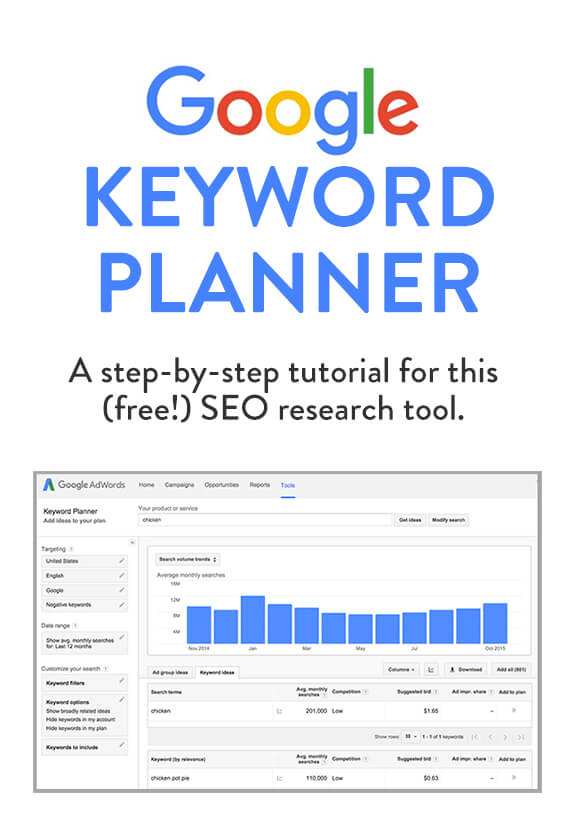
Credit: www.gimmesomeoven.com
Introduction To Google Keyword Planner
Google Keyword Planner is a powerful tool for SEO and digital marketing. It helps you find the right keywords to target in your content. This tool is essential for anyone looking to improve their search engine ranking.
Importance Of Keywords
Keywords are the foundation of any successful SEO strategy. They help search engines understand your content. Using the right keywords can drive traffic to your website. Google Keyword Planner helps you discover these valuable keywords.
Here are some reasons why keywords are important:
- They help search engines rank your site.
- They drive relevant traffic to your site.
- They help you understand what your audience is searching for.
Seo Strategy
Using Google Keyword Planner can significantly improve your SEO strategy. It provides insights into keyword competition and search volume. This helps you choose the best keywords to target.
Follow these steps to use Google Keyword Planner for your SEO strategy:
- Create a Google Ads account.
- Access the Keyword Planner tool.
- Enter keywords related to your niche.
- Analyze the search volume and competition.
- Select keywords that are relevant and have low competition.
Google Keyword Planner also helps you find long-tail keywords. These are phrases that are more specific and less competitive. Using long-tail keywords can improve your chances of ranking higher.
Here’s a quick comparison of short-tail and long-tail keywords:
| Short-tail Keywords | Long-tail Keywords |
|---|---|
| High competition | Low competition |
| High search volume | Low search volume |
| General terms | Specific phrases |
Incorporate these keywords naturally in your content. This will improve your SEO and help you reach your target audience. Google Keyword Planner is an invaluable tool for anyone looking to succeed online.
Setting Up Google Keyword Planner
Google Keyword Planner is a powerful tool for keyword research. It helps you find the right keywords for your content. This guide will help you set up Google Keyword Planner step by step.
Creating An Account
Before using Google Keyword Planner, you need a Google Ads account. Follow these steps to create one:
- Go to the Google Ads homepage.
- Click the “Start Now” button.
- Sign in with your Google account.
- Fill in your business information.
- Select your campaign goals and preferences.
Once you’ve completed these steps, your Google Ads account will be ready. Now, you can access the Keyword Planner tool.
Accessing The Tool
Now that you have a Google Ads account, follow these steps to access Google Keyword Planner:
- Log in to your Google Ads account.
- Click on the “Tools & Settings” icon in the top right corner.
- Under the “Planning” section, select “Keyword Planner”.
- Choose one of the two options:
- “Discover new keywords”
- “Get search volume and forecasts”
Google Keyword Planner is now ready for your keyword research. You can start discovering new keywords for your content strategy.
| Step | Action |
|---|---|
| 1 | Go to the Google Ads homepage |
| 2 | Click “Start Now” |
| 3 | Sign in with your Google account |
| 4 | Fill in your business information |
| 5 | Select campaign goals and preferences |
| 6 | Click on “Tools & Settings” icon |
| 7 | Select “Keyword Planner” |
| 8 | Choose an option: Discover new keywords or Get search volume and forecasts |
Navigating The Interface
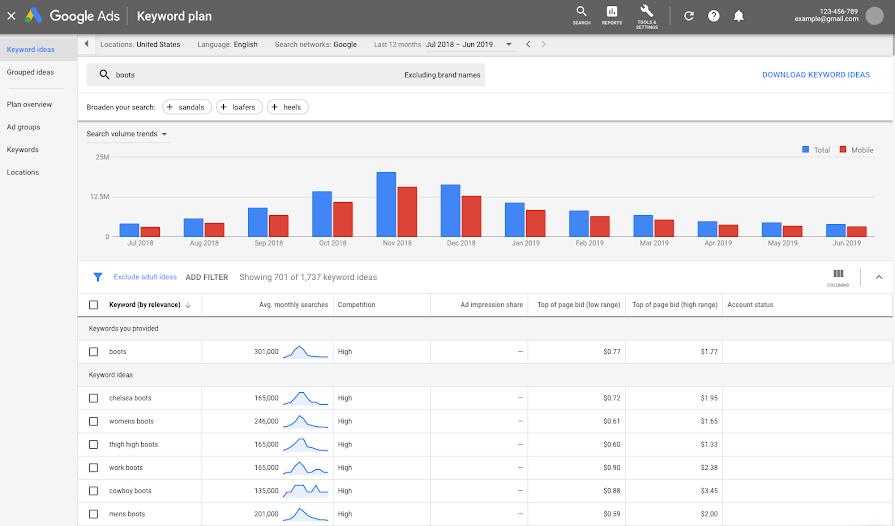
Google Keyword Planner is a powerful tool for finding keywords. To fully use it, you need to know the interface. This guide will help you navigate through it easily.
Dashboard Overview
The dashboard is the first screen you see. It has all the important options. You can start a new search or view saved keywords.
- Discover New Keywords: Find new keyword ideas.
- Get Search Volume and Forecasts: See how keywords perform.
| Option | Description |
|---|---|
| Discover New Keywords | Find ideas based on your input. |
| Get Search Volume and Forecasts | View data on keyword performance. |
Key Features
The interface has many key features. These make your keyword research easy and effective.
- Keyword Ideas: Get a list of related keywords.
- Search Volume: See how often a keyword is searched.
- Competition: Check the competition for each keyword.
- Forecasts: Predict how your keywords will perform.
Understanding these features will help you find the best keywords. Make sure to explore each one to see how they can benefit your strategy.
Credit: support.google.com
Conducting Keyword Research
Google Keyword Planner is a powerful tool for keyword research. It helps you find the best keywords for your content. This tool is essential for SEO. It ensures your website ranks higher in search results. Let’s explore how to conduct keyword research using Google Keyword Planner.
Finding Keywords
To start, log in to Google Keyword Planner. Click on “Discover new keywords”. Enter a word or phrase related to your topic. The tool will generate a list of related keywords. Use this list to find the best keywords for your content.
- Focus on keywords relevant to your niche.
- Look for keywords with high search volume.
- Consider long-tail keywords for specific topics.
Download the list of keywords. Review them carefully. Choose the ones that match your content goals. This step is crucial for effective keyword research.
Analyzing Search Volume
Next, analyze the search volume of your chosen keywords. Go back to Google Keyword Planner. Enter your list of keywords. Click on “Get search volume and forecasts”. The tool will show you the average monthly searches for each keyword.
| Keyword | Average Monthly Searches |
|---|---|
| SEO tips | 10,000 |
| Keyword research | 8,000 |
| Google Keyword Planner | 5,000 |
Choose keywords with higher search volume. These keywords attract more traffic to your site. Avoid keywords with very low search volume. They won’t bring much traffic.
By following these steps, you can conduct effective keyword research. Google Keyword Planner makes it easy. Use it to improve your SEO strategy.
Using Keyword Filters
Google Keyword Planner is a powerful tool for keyword research. One of its most useful features is the ability to filter keywords. By using keyword filters, you can narrow down your search. This helps you find the best keywords for your content. Filters make your keyword research more efficient.
Filter Options
Google Keyword Planner offers many filter options. You can filter by location, language, and search network. These filters help you target specific audiences. You can also filter by average monthly searches, competition, and bid range. These filters help you find keywords that match your goals.
| Filter | Description |
|---|---|
| Location | Target specific geographic areas. |
| Language | Select the language of the keywords. |
| Search Network | Choose between Google and its search partners. |
| Average Monthly Searches | Find keywords with a specific search volume. |
| Competition | Identify keywords with low, medium, or high competition. |
| Bid Range | Filter keywords based on suggested bid range. |
Refining Results
Refining your results is crucial for effective keyword research. Use multiple filters to narrow down your list. For example, filter by location and average monthly searches. This gives you a more targeted list of keywords. You can also use negative keywords. Negative keywords help exclude irrelevant results.
To refine your results, follow these steps:
- Open Google Keyword Planner.
- Enter your seed keyword.
- Apply filters like location and language.
- Adjust other filters like average monthly searches and competition.
- Review the refined list of keywords.
Refining your results saves time. It also improves the quality of your keyword research. Use filters to find the most relevant keywords. This makes your content more effective.
Creating A Keyword Plan
Creating a keyword plan using Google Keyword Planner is crucial. It helps in targeting the right audience and improving website visibility. This section will guide you on how to create an effective keyword plan.
Organizing Keywords
Start by organizing keywords into relevant groups. This ensures that your content is focused and targeted. Use keyword themes to group similar keywords together.
- Identify primary keywords
- Find related keywords
- Create keyword clusters
For example, if your website is about cooking, group keywords like “easy recipes,” “quick meals,” and “healthy snacks” together.
Setting Goals
Next, focus on setting goals for your keyword plan. Determine what you want to achieve with your keywords. Your goals might include increasing website traffic or improving search engine rankings.
- Define your target audience
- Set specific, measurable goals
- Align keywords with your goals
For instance, if you aim to boost traffic, prioritize high-volume keywords. If you seek higher engagement, choose more specific, long-tail keywords.
| Goal | Keyword Type | Example |
|---|---|---|
| Increase Traffic | High-volume Keywords | Cooking Tips |
| Improve Engagement | Long-tail Keywords | Easy Vegan Recipes |
By organizing keywords and setting clear goals, you can create a successful keyword plan. This approach ensures your efforts are focused and effective.
Implementing Keywords In Content
Google Keyword Planner helps you find the best keywords for your content. By using these keywords, you can improve your website’s visibility. Let’s explore how to implement these keywords effectively.
On-page Seo
On-page SEO is vital for search engine ranking. Place keywords in the title tag and meta description. This helps search engines understand your content.
Use keywords in the URL. This makes it easier for users to find your page. Also, include keywords in the header tags (H1, H2, H3). This helps structure your content better.
Here is a simple example:
Best SEO Practices
Learn the best SEO practices for your website.
Ensure the keyword appears naturally. It should fit within the content flow.
Content Optimization
Content optimization makes your text more user-friendly. Use keywords in the first 100 words of your content. This grabs the reader’s attention quickly.
Include keywords in the body text but avoid keyword stuffing. Aim for a keyword density of about 1-2%. This keeps your content readable.
Here is a table to help you:
| Content Length | Keyword Count |
|---|---|
| 500 words | 5-10 times |
| 1000 words | 10-20 times |
Use synonyms and related terms. This enriches your content and avoids repetition.
Here is a simple list:
- Primary keyword
- Synonym
- Related term
Incorporate these practices to optimize your content effectively.
Credit: backlinko.com
Tracking Performance
Tracking performance in Google Keyword Planner is vital. It ensures your SEO efforts are effective. By monitoring keyword rankings and adjusting strategies, you can optimize your content. This helps to drive more traffic to your site.
Monitoring Rankings
Keeping an eye on your keyword rankings is crucial. Regularly check how your keywords perform. Use Google Keyword Planner’s tools to monitor changes. This helps you understand which keywords are winning. Track the following:
- Keyword positions
- Search volumes
- Click-through rates
Creating a table can help visualize this data:
| Keyword | Position | Search Volume | CTR |
|---|---|---|---|
| SEO Tips | 1 | 10,000 | 20% |
| Keyword Research | 3 | 8,000 | 15% |
Adjusting Strategy
Adjust your strategy based on keyword performance. If a keyword drops, tweak your content. Consider creating new posts around high-performing keywords. This keeps your content fresh and relevant. Use the following methods:
- Update existing content
- Add new internal links
- Optimize meta descriptions
Making small adjustments can lead to big changes. Stay proactive in your approach. Track, analyze, and adjust regularly.
Advanced Tips And Tricks
Google Keyword Planner is a powerful tool for digital marketers. Learning advanced tips and tricks can elevate your keyword strategy. This section will explore ways to maximize the tool’s potential.
Long-tail Keywords
Long-tail keywords are specific search phrases. They often have lower competition. These keywords can drive targeted traffic to your site. Google Keyword Planner helps you identify them.
- Start with a broad keyword.
- Review the suggested long-tail keywords.
- Focus on keywords with lower competition.
Long-tail keywords often have a higher conversion rate. Users searching for these terms know what they want. This makes them more likely to convert.
Competitive Analysis
Competitive analysis helps you understand your market. Google Keyword Planner provides valuable insights. You can see which keywords your competitors are bidding on.
- Enter your competitor’s URL in the tool.
- Analyze the suggested keywords.
- Identify gaps in your competitor’s strategy.
| Keyword | Competition Level | Suggested Bid |
|---|---|---|
| Keyword 1 | High | $2.50 |
| Keyword 2 | Medium | $1.75 |
| Keyword 3 | Low | $0.90 |
Use this data to refine your own keyword strategy. Target keywords with high potential and low competition. This will help you gain an edge over your competitors.
Frequently Asked Questions
What Is Google Keyword Planner?
Google Keyword Planner is a free tool by Google Ads. It helps users find relevant keywords for their campaigns.
How Do I Use Google Keyword Planner?
To use Google Keyword Planner, sign in to Google Ads. Navigate to the tool and start your keyword research.
Is Google Keyword Planner Free?
Yes, Google Keyword Planner is free. You need a Google Ads account to access it.
Can I Find Long-tail Keywords?
Yes, Google Keyword Planner can help you find long-tail keywords. It provides keyword suggestions based on your inputs.
Conclusion
Google Keyword Planner is essential for crafting effective SEO strategies. It provides valuable insights and helps identify high-ranking keywords. Utilize this tool to enhance your content and drive more traffic to your site. With consistent use, your online visibility and engagement can significantly improve.
Start leveraging Google Keyword Planner today for better SEO results.

