
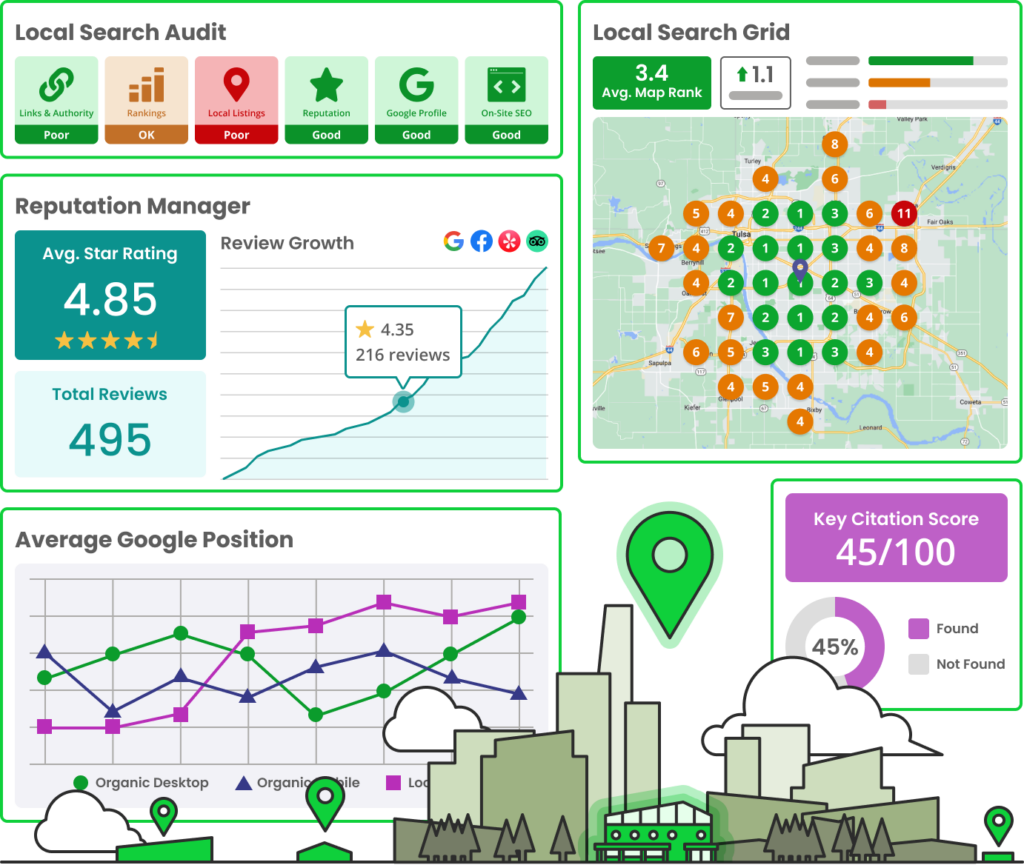
BrightLocal is a powerful local SEO tool designed to help businesses improve their online presence. It offers features such as citation building, review management, and local search rank tracking.
BrightLocal assists businesses in enhancing their local search performance. It provides tools for citation building, which ensures business information is consistent across directories. Review management features help gather, monitor, and respond to customer reviews, boosting online reputation. The tool also tracks local search rankings, offering insights on how businesses perform in search results.
Its user-friendly dashboard simplifies data management and analysis. BrightLocal is ideal for small businesses, agencies, and multi-location companies aiming to increase visibility and drive local traffic. Its comprehensive features make it a valuable asset in local SEO strategy.
Introduction To Brightlocal
Brightlocal is a powerful local SEO tool designed to help businesses improve their online presence. It offers a comprehensive suite of features that simplify the process of managing and optimizing local SEO campaigns. This tool is especially beneficial for small businesses, marketing agencies, and SEO professionals looking to enhance their local search rankings.
Purpose Of The Tool
The primary purpose of Brightlocal is to boost your local SEO efforts. It aims to improve your visibility in local search results. This can lead to increased traffic, more leads, and higher sales.
Brightlocal is designed to streamline various aspects of local SEO. It assists in citation building, review management, and local rank tracking. The tool also provides detailed insights and reports to help you make informed decisions.
Key Features
Brightlocal offers a range of features tailored to meet different local SEO needs. Here are some of the key features:
- Local Search Rank Checker: Monitors your search rankings in multiple locations.
- Citation Tracker: Keeps track of your business listings across the web.
- Review Management: Helps you collect and manage customer reviews.
- SEO Audit: Provides a comprehensive audit of your website’s SEO performance.
- Google My Business Integration: Syncs with your GMB profile for better management.
Brightlocal also offers customizable reports. These reports are easy to understand and share with clients or team members. The tool provides real-time data, ensuring you have the latest information at your fingertips.
| Feature | Description |
|---|---|
| Local Search Rank Checker | Tracks your search rankings across different locations. |
| Citation Tracker | Monitors your business listings on various platforms. |
| Review Management | Helps you gather and manage customer reviews. |
| SEO Audit | Conducts a detailed audit of your website’s SEO. |
| Google My Business Integration | Syncs with GMB for better profile management. |
Brightlocal is a versatile tool for anyone serious about local SEO. Its user-friendly interface and robust features make it a valuable asset. Whether you’re a small business owner or an SEO professional, Brightlocal can help you achieve your local SEO goals.
Credit: www.brightlocal.com
Setting Up Your Account
Getting started with BrightLocal is simple and quick. Follow these steps to set up your account and begin your local SEO journey.
Creating An Account
To create an account, visit the BrightLocal website. Click on the Sign Up button at the top right corner. You will be directed to the registration page.
- Enter your email address.
- Create a secure password.
- Fill in your business information.
- Agree to the terms and conditions.
Once completed, click on the Create Account button. A confirmation email will be sent to you. Verify your email to activate your account.
Initial Configuration
After activating your account, log in to access the dashboard. The initial configuration involves setting up your business profile.
- Click on Add New Business.
- Fill in your business name, address, and phone number.
- Select your business category.
Next, connect your Google My Business account. This step helps in tracking your local search performance. Follow the on-screen instructions to link your account.
| Field | Description |
|---|---|
| Business Name | The name of your business |
| Address | Your business location |
| Phone Number | Your contact number |
| Category | Your business type |
These fields are crucial for accurate local SEO tracking. Double-check your information before saving.
Keyword Research
Keyword Research is the backbone of any successful SEO strategy. With the Brightlocal Local SEO Tool, businesses can find the best keywords to drive traffic. This tool helps you target the right audience and stay ahead of competitors. Let’s dive into the key aspects of Keyword Research with Brightlocal.
Finding Local Keywords
Finding the right local keywords is crucial. Brightlocal makes this process simple. Follow these steps to get started:
- Open the Brightlocal dashboard.
- Navigate to the Keyword Research section.
- Enter your business location and industry.
- Generate a list of local keywords.
Brightlocal will show you keywords with high search volume. It also provides information on keyword difficulty and relevance. This ensures you focus on the most impactful terms.
Analyzing Competitors
Understanding your competition is vital. Brightlocal helps you analyze your competitors’ keywords. Here’s how you can do it:
- Go to the Competitor Analysis section.
- Enter the URL of your top competitors.
- Review the keywords they rank for.
Compare their keyword strategy with yours. Brightlocal offers insights into keyword gaps. This reveals opportunities where you can outperform your competitors.
Here’s a quick comparison table to help:
| Aspect | Your Business | Competitor |
|---|---|---|
| Top Keywords | Keyword 1, Keyword 2 | Keyword A, Keyword B |
| Search Volume | 1000 | 2000 |
| Keyword Difficulty | Medium | High |
This table helps you quickly identify areas for improvement. Use this data to refine your SEO strategy.
On-page Seo
On-page SEO is essential for improving your local search rankings. It involves optimizing individual web pages to rank higher and earn more relevant traffic. BrightLocal’s Local SEO tool offers robust features to help you with on-page SEO efforts.
Optimizing Content
Optimizing content is key to on-page SEO. Ensure your content is relevant and valuable. Use local keywords naturally within your text.
Here’s a simple checklist to follow:
- Use short paragraphs.
- Include local keywords.
- Write engaging titles.
- Use bullet points.
BrightLocal helps you analyze your content. It provides recommendations to improve readability and keyword placement.
Meta Descriptions
Meta descriptions are brief summaries of your web pages. They appear under your page title in search results.
Follow these tips to write effective meta descriptions:
- Keep it under 160 characters.
- Include a call-to-action.
- Use your main keyword.
- Make it compelling.
BrightLocal offers tools to help you craft perfect meta descriptions. It ensures they are optimized for local search.
| Element | Best Practice |
|---|---|
| Title | Use primary keyword, keep it under 60 characters. |
| Meta Description | Include a call-to-action, keep it under 160 characters. |
Using BrightLocal, you can track changes and see improvements in real-time.
Managing Local Citations
Local citations are crucial for local SEO. They help your business appear in local search results. Brightlocal’s Local SEO Tool makes managing local citations easy. It ensures your business information is accurate and consistent.
Building Citations
Building citations involves listing your business on various platforms. These platforms include directories, websites, and social networks. Brightlocal helps you find the best places to list your business. It also aids in creating new citations quickly.
- Identify top directories for your industry.
- Submit your business details.
- Verify listings for accuracy.
Brightlocal provides a step-by-step guide. It simplifies the process of building citations. You can ensure your business is listed on credible sites. This boosts your local search rankings.
Monitoring Consistency
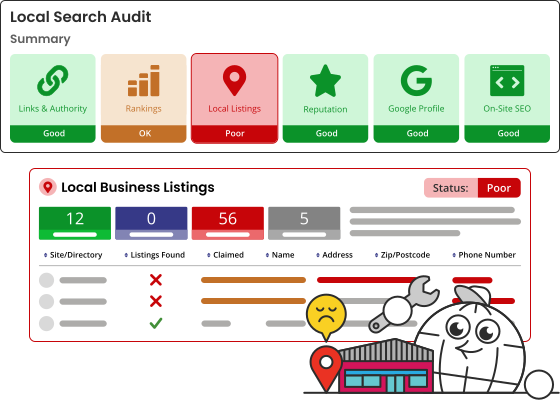
Monitoring consistency is key. Your business details must be the same everywhere. Brightlocal checks your information on different platforms. It highlights any inconsistencies.
You can update your business information using Brightlocal. This ensures all listings are accurate. Consistent citations improve your local search visibility.
| Platform | Status | Action |
|---|---|---|
| Google My Business | Verified | None |
| Yelp | Pending | Update Information |
| Verified | None |
Brightlocal makes it easy to manage local citations. It helps build and monitor citations effectively. This ensures your business is always visible in local searches.
Online Reviews
Online reviews play a crucial role in local SEO. They help businesses build trust and attract more customers. The BrightLocal Local SEO Tool makes managing online reviews simple and effective.
Generating Reviews
Generating reviews is essential for local businesses. BrightLocal offers tools to request reviews from customers. These tools help you gather more reviews quickly.
- Send review requests via email.
- Use SMS to ask for reviews.
- Embed review forms on your website.
Positive reviews boost your local SEO ranking. They also build trust with new customers. Consistently asking for reviews ensures a steady flow of feedback.
Responding To Feedback
Responding to feedback shows you value customer opinions. BrightLocal allows you to manage and respond to reviews from one dashboard.
Quick and thoughtful responses improve your business’s reputation. Addressing negative reviews shows you care about customer satisfaction.
| Type of Review | Response Strategy |
|---|---|
| Positive Review | Thank the customer and highlight positive points. |
| Negative Review | Apologize, address the issue, and offer a solution. |
BrightLocal’s tools streamline the feedback process. This helps maintain a positive online presence.
Tracking Performance
Tracking performance is key in local SEO. BrightLocal offers robust features to monitor and enhance your local search presence. Let’s delve into how to use analytics and adjust strategies.
Using Analytics
BrightLocal provides comprehensive analytics to track performance. These insights help understand what works and what needs improvement.
- Keyword Tracking: Monitor your keyword rankings in local searches.
- Google My Business Insights: Gain insights into your GMB profile’s performance.
- Local Search Audit: Identify strengths and weaknesses in your local search presence.
Using these analytics, you can make data-driven decisions. This ensures your SEO strategies are effective.
Adjusting Strategies
With analytics in hand, you can adjust your strategies. This helps optimize performance and achieve better results.
- Analyze Data: Review your analytics to find patterns and trends.
- Set Goals: Define clear goals based on your data analysis.
- Implement Changes: Make necessary adjustments to your SEO tactics.
- Monitor Progress: Keep tracking your performance to ensure improvements.
Regular adjustments keep your SEO strategy aligned with changing trends. This is crucial for long-term success.
Advanced Features
Brightlocal Local SEO Tool offers some advanced features for businesses. These features help improve local search rankings and visibility. Let’s explore two of these powerful features.
White-label Reports
One standout feature is the White-Label Reports. These reports allow you to brand the SEO data. You can add your logo and colors. This makes the reports look professional and customized.
White-Label Reports are easy to generate. You can schedule them to send automatically. This saves time and ensures consistency. Clients appreciate the personalized touch.
Here are some benefits of White-Label Reports:
- Brand consistency
- Professional appearance
- Automated delivery
Competitor Analysis
Another key feature is Competitor Analysis. This feature helps you understand your competition. You can see how they rank for keywords. You can also analyze their strengths and weaknesses.
Competitor Analysis provides valuable insights. You can adjust your strategy based on this data. This helps you stay ahead in local searches.
Key advantages of Competitor Analysis:
- Identify top competitors
- Understand their SEO tactics
- Spot opportunities for improvement
These advanced features make Brightlocal Local SEO Tool a robust choice. It helps businesses enhance their local SEO efforts effectively.
Case Studies
Brightlocal’s Local SEO Tool has helped many businesses improve their online presence. Case studies show real-world examples of success. These stories offer valuable insights and practical lessons. Here, we explore some of these fascinating case studies.
Success Stories
Brightlocal has a range of success stories showing impressive results. Below are a few notable examples:
| Company | Industry | Results |
|---|---|---|
| ABC Dental | Healthcare | Increased local search visibility by 40% |
| FreshMart | Retail | Boosted online reviews by 60% |
| HomeFix | Services | Gained 25% more website traffic |
ABC Dental used Brightlocal to improve their local SEO. They saw a 40% increase in local search visibility. This led to more appointments and happier patients.
FreshMart, a local grocery store, focused on boosting online reviews. Their positive reviews increased by 60%. This brought in more foot traffic and higher sales.
HomeFix, a home repair service, wanted more website traffic. They used Brightlocal and saw a 25% increase. This led to more job requests and satisfied clients.
Lessons Learned
Each case study provides valuable lessons. Here are some key takeaways:
- Focus on Reviews: Positive reviews attract more customers.
- Local Search Visibility: Higher visibility leads to more business opportunities.
- Website Traffic: More traffic means more potential clients.
ABC Dental learned the importance of local search visibility. FreshMart saw the value in positive reviews. HomeFix found that increased website traffic brought in more clients. These lessons are crucial for any business aiming to grow locally.

Credit: www.brightlocal.com

Credit: www.brightlocal.com
Frequently Asked Questions
What Is Brightlocal Local Seo Tool?
Brightlocal Local SEO Tool helps businesses improve their local search rankings. It offers features like citation tracking, review management, and local search audits.
How Does Brightlocal Improve Local Seo?
Brightlocal improves local SEO by monitoring citations, managing online reviews, and providing detailed local search audits. These tools enhance visibility.
Is Brightlocal Easy To Use?
Yes, Brightlocal is user-friendly. It offers a simple interface and comprehensive tutorials. You can quickly set up and optimize your local SEO.
Can Brightlocal Manage Online Reviews?
Yes, Brightlocal can manage online reviews. It helps you track, respond to, and analyze reviews from multiple platforms.
Conclusion
Brightlocal Local SEO Tool offers powerful features for local businesses. It simplifies SEO tasks and boosts online visibility. With its user-friendly interface, anyone can enhance their local search rankings. Investing in this tool can drive more traffic and increase customer engagement.
Elevate your local SEO strategy with Brightlocal and see tangible results.


