

To optimize Google Ads campaigns, focus on keyword selection and ad relevancy. Regularly monitor performance metrics for adjustments.
Google Ads can drive significant traffic and conversions when optimized correctly. Understanding the importance of keywords and ad relevancy is crucial. Choosing the right keywords ensures your ads appear for relevant searches. Crafting compelling ads that align with these keywords enhances your click-through rates.
Regularly reviewing performance metrics helps identify what’s working and what needs improvement. By continuously refining your approach, you can maximize your return on investment. Consistent monitoring and tweaking keep your campaigns effective and competitive. Effective optimization requires a balance of strategy, analysis, and adaptability. This focused approach ensures your ads reach the right audience, driving better results for your business.
Keyword Research
Effective keyword research is the backbone of any successful Google Ads campaign. It ensures your ads reach the right audience and maximizes your return on investment. This section will guide you through the process of finding the right keywords and using keyword tools to enhance your campaign.
Finding The Right Keywords
To find the right keywords, start by understanding your target audience. Think about what words they might use to search for your product or service. Consider their needs and the problems your product solves.
Here are steps to help you identify the right keywords:
- Make a list of relevant topics related to your business.
- Identify specific terms and phrases within these topics.
- Use variations and synonyms of these terms.
- Consider the intent behind each keyword. Is it informational or transactional?
Using Keyword Tools
Keyword tools are essential for refining and expanding your keyword list. They help you discover new keyword opportunities and analyze their performance metrics.
Here are some popular keyword tools:
- Google Keyword Planner: Provides search volume and forecasts.
- SEMrush: Offers keyword suggestions and competitive analysis.
- Ahrefs Keywords Explorer: Provides keyword difficulty and click metrics.
Using these tools, you can:
| Action | Description |
|---|---|
| Identify high-volume keywords | Find keywords with a large number of searches. |
| Analyze competition | Understand how difficult it is to rank for a keyword. |
| Discover long-tail keywords | Find specific phrases with lower competition. |
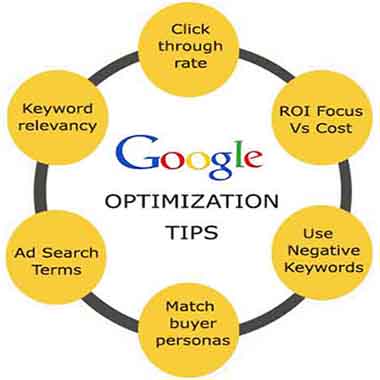
Regularly update your keyword list to stay relevant and competitive. Monitor keyword performance and adjust your strategy accordingly.
Credit: www.hillwebcreations.com
Ad Copywriting
Ad copywriting is a crucial aspect of optimizing Google Ads campaigns. Your ad copy must grab attention and persuade users to click. The two main components are headlines and descriptions. Each element serves a unique purpose and must be crafted with care. Let’s dive into the key strategies for effective ad copywriting.
Crafting Compelling Headlines
Headlines are the first thing users see. They need to be engaging and relevant. A good headline can significantly increase your click-through rate (CTR).
- Use action verbs to inspire immediate action.
- Include keywords to match user intent.
- Create urgency with phrases like “Limited Time Offer”.
- Ensure the headline is short and to the point.
| Do | Don’t |
|---|---|
| Use numbers and stats | Use vague terms |
| Include emotional triggers | Make false promises |
| Test different headlines | Ignore A/B testing |
Writing Persuasive Descriptions
Descriptions provide more details and support the headline. They help convince the user to click on your ad.
- Highlight benefits over features.
- Use clear and concise language.
- Incorporate social proof, like testimonials.
- Include a call-to-action (CTA), such as “Buy Now”.
Effective descriptions make your ad stand out and drive more clicks. Ensure your message is consistent and compelling.
Audience Targeting
Audience targeting is the cornerstone of any successful Google Ads campaign. By reaching the right people, you can maximize your return on investment. This section explores different ways to refine your audience targeting to ensure your ads reach those most likely to convert.
Demographic Targeting
Demographic targeting allows you to reach specific groups based on certain characteristics. These include age, gender, income, and parental status. This method helps you tailor your ads to a more precise audience.
- Age: Adjust your bids for different age groups.
- Gender: Focus on male or female audiences.
- Income: Target users based on their household income levels.
- Parental Status: Reach parents or non-parents.
By refining demographic targeting, you can better match your ads to the most relevant audience segments.
Interest-based Targeting
Interest-based targeting allows you to reach users based on their interests and online behaviors. Google categorizes users into interest groups based on their browsing history and activity.
- Affinity Audiences: These are users with a strong interest in specific topics.
- In-Market Audiences: These users are actively researching or planning to purchase products.
- Custom Intent Audiences: Create custom audiences based on specific keywords and URLs.
Utilizing interest-based targeting ensures your ads reach users who are more likely to be interested in your products or services.
Below is a summary table for quick reference:
| Targeting Type | Key Characteristics |
|---|---|
| Demographic Targeting | Age, Gender, Income, Parental Status |
| Interest-Based Targeting | Affinity Audiences, In-Market Audiences, Custom Intent Audiences |
By focusing on both demographic and interest-based targeting, you can optimize your Google Ads campaigns for better performance.
Bid Management
Bid Management is a critical aspect of optimizing Google Ads campaigns. It involves setting and adjusting your bids to achieve the best possible performance. Effective bid management helps you maximize your return on investment (ROI) and reach your advertising goals.
Setting Bid Strategies
Choosing the right bid strategy is the first step in optimizing your Google Ads campaigns. Google offers several bid strategies to suit different objectives. Here are some common bid strategies:
- Target CPA (Cost Per Acquisition): This strategy aims to get as many conversions as possible at your target CPA.
- Target ROAS (Return on Ad Spend): Focuses on maximizing revenue based on your return on ad spend target.
- Maximize Clicks: Aims to get as many clicks as possible within your budget.
- Manual CPC (Cost Per Click): Gives you full control over your bids, allowing you to set the maximum CPC for each keyword.
To choose the best strategy, consider your campaign goals and budget. Use the strategy that aligns with your key performance indicators (KPIs).
Adjusting Bids For Performance
Adjusting bids based on performance is crucial for bid management. Regularly review your campaign data to make informed decisions. Here are some tips:
- Use Bid Adjustments: Modify bids based on device, location, and time of day to optimize performance.
- Analyze Keyword Performance: Increase bids for high-performing keywords and decrease bids for low-performing ones.
- Monitor Competitors: Keep an eye on competitor bids and adjust yours to stay competitive.
- Leverage Automated Rules: Set up automated rules to adjust bids based on specific conditions.
Here is a simple example of how to adjust bids:
| Condition | Bid Adjustment |
|---|---|
| Mobile Devices | +20% |
| Evening Hours | +15% |
| Low Performing Keywords | -10% |
Regular adjustments help you stay on track with your advertising goals. Use bid management tools to simplify the process.
Quality Score Improvement
Improving your Google Ads Quality Score is crucial for a successful campaign. A higher Quality Score can lower your cost-per-click and improve your ad position. Here, we will discuss key strategies to enhance your Quality Score.
Enhancing Ad Relevance
Ad relevance is a critical factor for Quality Score. Make sure your ads closely match the keywords you are targeting. Use the following tips:
- Use Specific Keywords: Avoid generic terms. Be specific and accurate.
- Match Ad Copy: Ensure your ad copy reflects the keywords.
- Segment Ad Groups: Organize similar keywords into specific ad groups.
Optimizing Landing Pages
Your landing page experience impacts your Quality Score. A well-optimized landing page can significantly boost your score. Focus on these elements:
- Relevance: Ensure the landing page content matches the ad.
- Load Speed: Fast-loading pages improve user experience.
- Mobile-Friendly: Optimize for mobile users.
- Clear Call-to-Action: Make it easy for users to convert.
Use the following table to summarize key aspects:
| Factor | Action |
|---|---|
| Keywords | Use specific, relevant keywords. |
| Ad Copy | Match ad copy to keywords. |
| Ad Groups | Segment similar keywords. |
| Landing Page | Match content, improve load speed, be mobile-friendly. |

Credit: ppcexpo.com
A/b Testing
A/B Testing is a powerful method to optimize your Google Ads campaigns. It involves comparing two versions of an ad to see which performs better. This helps you make data-driven decisions and improve your return on investment.
Testing Ad Variations
Testing ad variations is essential for finding the best-performing ads. Start by creating two different versions of your ad. Change only one element at a time to see which performs better. This element could be the headline, description, or call-to-action.
- Headline: Test different headlines to see which grabs more attention.
- Description: Try various descriptions to find the most compelling one.
- Call-to-Action: Experiment with different calls-to-action to see which drives more clicks.
Analyzing Test Results
Analyzing test results is crucial for understanding what works. Use Google Ads’ built-in analytics tools to measure performance. Look at metrics like click-through rate (CTR), conversion rate, and cost per click (CPC).
| Metric | Version A | Version B |
|---|---|---|
| Click-Through Rate (CTR) | 2.5% | 3.0% |
| Conversion Rate | 1.2% | 1.5% |
| Cost Per Click (CPC) | $0.50 | $0.45 |
Identify which version has better metrics. The ad with higher CTR and conversion rate is usually the winner. Use these insights to refine your ads further.
Remember, A/B Testing should be an ongoing process. Regularly test new variations to keep improving your ads.
Performance Monitoring
Performance monitoring is key to optimizing your Google Ads campaigns. This process helps you understand how well your ads are doing. It involves tracking various metrics and using tools like Google Analytics to gain insights. Let’s dive into the essentials of performance monitoring.
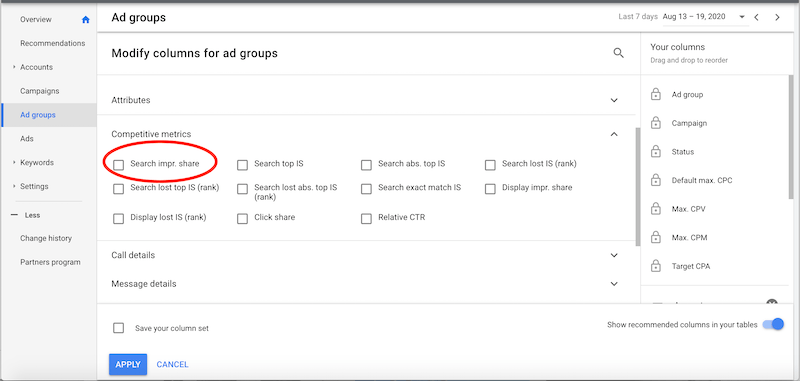
Tracking Key Metrics
Tracking key metrics is crucial for understanding your campaign’s performance. Here are some important metrics to monitor:
- Click-Through Rate (CTR): Measures the number of clicks per ad impression.
- Conversion Rate: Indicates the percentage of clicks that result in a desired action.
- Cost Per Click (CPC): The average cost you pay for each click on your ad.
- Return on Ad Spend (ROAS): Calculates the revenue generated for every dollar spent on ads.
Use these metrics to gauge the effectiveness of your ads. Regularly check these numbers to make data-driven decisions.
Utilizing Google Analytics
Google Analytics is a powerful tool for monitoring performance. It provides detailed insights into user behavior and campaign effectiveness. Here’s how to utilize it:
- Set Up Goals: Define clear goals in Google Analytics to track conversions.
- Link Accounts: Ensure your Google Ads and Analytics accounts are linked for seamless data flow.
- Analyze Reports: Use reports to understand user behavior and campaign performance.
Google Analytics helps you see what’s working and what needs improvement. Make use of its features to optimize your campaigns effectively.
| Metric | Importance | How to Improve |
|---|---|---|
| CTR | High | Improve ad copy and targeting. |
| Conversion Rate | Very High | Enhance landing pages and user experience. |
| CPC | Medium | Adjust bids and use negative keywords. |
| ROAS | Critical | Optimize ad spend and focus on high-performing keywords. |
Credit: www.wordstream.com
Budget Optimization
Optimizing your Google Ads budget is crucial for the success of your campaigns. It ensures your money is spent effectively and yields the highest returns. Here’s how to do it right:
Allocating Budget Wisely
Allocating your budget wisely can make a significant difference in your campaign’s performance. Focus on your highest-performing keywords and ads to maximize impact. Here are some tips:
- Identify high-performing keywords: Use Google Analytics to track performance.
- Distribute budget based on performance: Allocate more to top keywords.
- Use dayparting: Adjust bids based on the time of day.
- Geotargeting: Focus on locations where your ads perform best.
Maximizing Roi
Maximizing ROI should be your primary goal. It ensures you get the best returns from your ad spend. Follow these steps to achieve this:
- Track conversions: Use conversion tracking to measure success.
- Optimize ad copy: Write compelling ad copy to increase click-through rates.
- A/B testing: Test different versions of ads to find the most effective one.
- Use negative keywords: Exclude irrelevant searches to save money.
Example Budget Allocation Table
The table below shows an example of how to allocate your budget based on performance:
| Keyword | Monthly Spend | Performance |
|---|---|---|
| Keyword A | $500 | High |
| Keyword B | $300 | Medium |
| Keyword C | $200 | Low |
By following these steps, you can optimize your Google Ads budget effectively. This approach ensures you get the best return on your investment.
Frequently Asked Questions
How Can I Improve Google Ads Performance?
To improve Google Ads performance, focus on keyword optimization, ad relevance, and landing page experience. Use negative keywords to filter out irrelevant traffic. Regularly review and adjust your bids and budget.
What Are Negative Keywords In Google Ads?
Negative keywords prevent your ads from showing for irrelevant searches. This helps refine your audience and improve ad performance, ensuring your budget is spent efficiently.
How Do I Use Ad Extensions?
Ad extensions enhance your ad by providing additional information like phone numbers, site links, and location. They increase click-through rates and improve ad relevance, making your ads more attractive.
How Important Is Quality Score In Google Ads?
Quality Score is crucial for Google Ads. It affects your ad rank and cost-per-click. Higher Quality Scores lead to better ad placements and lower costs, improving overall campaign performance.
Conclusion
Mastering Google Ads optimization can significantly boost your campaign performance. Remember to analyze data regularly and adjust strategies. Implementing these tips will improve your ad relevance and ROI. Stay updated with Google’s latest features and tools. Successful optimization requires ongoing effort and attention to detail.
Happy advertising!