

Google Search Console is a free tool by Google for monitoring, maintaining, and troubleshooting a website’s presence in Google Search results. It provides insights to help improve your site’s visibility and performance.
Google Search Console is an essential tool for website owners and SEO professionals. It offers valuable data on website traffic, search queries, and backlinks. This information helps optimize your site to rank higher in search results. You can also identify and fix issues like crawl errors, mobile usability problems, and security vulnerabilities.
Regularly using Google Search Console ensures your website remains healthy and competitive. With its user-friendly interface and comprehensive reports, even beginners can navigate it easily. Make the most of this powerful tool to enhance your site’s online presence.
Introduction To Google Search Console
Google Search Console is a powerful tool for website owners. It helps you monitor, maintain, and troubleshoot your site’s presence in Google Search results. This tool provides essential insights and data to improve your website’s visibility and performance.
Purpose And Benefits
The primary purpose of Google Search Console is to ensure your website is indexed and ranked properly on Google. Below are the key benefits:
- Monitoring Performance: Track your site’s search performance and identify trends.
- Index Coverage: Ensure all your pages are indexed by Google.
- Search Analytics: Understand which queries bring traffic to your site.
- Mobile Usability: Check if your site is mobile-friendly.
- Security Issues: Get alerts about malware or hacking attempts.
| Feature | Benefit |
|---|---|
| Performance Reports | Analyze search traffic and improve SEO strategy. |
| URL Inspection | Diagnose and fix indexing issues. |
| Sitemaps | Submit sitemaps to ensure proper indexing. |
Who Should Use It
Google Search Console is beneficial for various users:
- Website Owners: Monitor site health and performance.
- SEO Professionals: Optimize site for better rankings.
- Web Developers: Fix indexing and crawling issues.
- Content Creators: Understand which content drives traffic.
- Website Owners: Keep your site in top shape.
- SEO Professionals: Enhance search visibility.
- Web Developers: Resolve technical issues.
- Content Creators: Improve content strategies.
Setting Up Your Account
Google Search Console is a powerful tool. It helps you monitor your website’s performance. Setting up your account is the first step. This section will guide you through the process.
Creating An Account
First, you need a Google account. If you don’t have one, create it. Follow these simple steps:
- Go to the Google Sign Up page.
- Enter your details: Name, Username, and Password.
- Click on “Next” and verify your account with a phone number.
- Complete the profile setup by adding a recovery email.
- Agree to Google’s Terms of Service and Privacy Policy.
Once your Google account is ready, you can proceed to the next step.
Adding Your Website
Now, it’s time to add your website to Google Search Console. Follow these steps:
- Go to the Google Search Console website.
- Click on the “Start Now” button.
- Sign in with your Google account.
- Click on “Add Property” in the top left corner.
- Choose the property type: Domain or URL Prefix.
| Domain | URL Prefix |
|---|---|
| Includes all subdomains | Specific to one URL |
| Requires DNS verification | Supports multiple verification methods |
- Enter your domain or URL.
- Follow the verification steps provided.
- Once verified, your website is added.
Congratulations! You have successfully set up your Google Search Console account.
Key Features And Tools
Google Search Console offers many powerful features for website owners. These tools help monitor and maintain your site’s presence in Google Search results. Let’s explore some of the key features and tools available.
Performance Reports
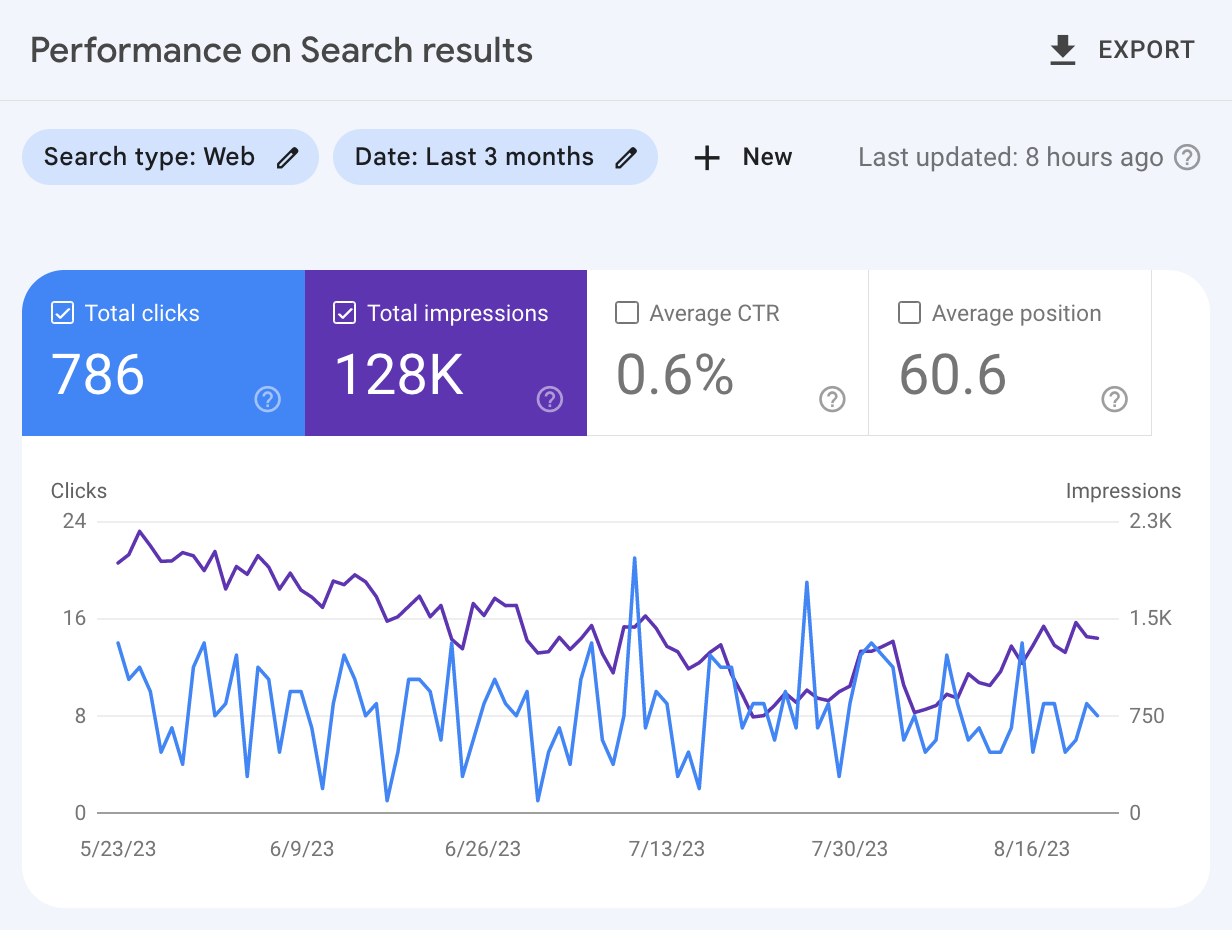
The Performance Reports in Google Search Console provide valuable insights. You can see how your site performs in search results. Key metrics include:
- Clicks: Number of clicks from Google Search.
- Impressions: How often your site appears in search results.
- Click-Through Rate (CTR): Ratio of clicks to impressions.
- Average Position: Your site’s average ranking position.
These metrics help identify which pages are performing well. You can optimize underperforming pages based on this data.
Url Inspection Tool
The URL Inspection Tool provides detailed information about specific URLs on your site. You can check:
- Index Status: Verify if a URL is indexed by Google.
- Crawl Issues: Identify any problems with crawling.
- Mobile Usability: Ensure the URL is mobile-friendly.
To use this tool, simply enter a URL. Google will display all relevant information. This helps resolve issues quickly and improve your site’s performance.
Credit: www.semrush.com
Analyzing Performance Data
Google Search Console offers a treasure trove of performance data. This data helps you understand your website’s performance. Analyzing this data can improve your site’s visibility and ranking.
Traffic Insights
Traffic insights show how many users visit your site. It also reveals the pages they visit the most. This data is essential for understanding user behavior.
- Total Clicks: The number of times users clicked on your site.
- Total Impressions: The number of times your site appeared in search results.
- Average CTR: The click-through rate, calculated as clicks divided by impressions.
- Average Position: The average ranking position of your site in search results.
Search Queries Analysis
Search queries analysis helps you know which keywords drive traffic. This data shows what users are searching for. It can help you optimize your content.
| Query | Clicks | Impressions | CTR | Position |
|---|---|---|---|---|
| example keyword 1 | 100 | 1000 | 10% | 5 |
| example keyword 2 | 50 | 500 | 10% | 8 |
Pay attention to keywords with high impressions but low clicks. These are opportunities for improvement. Adjusting your content can increase your CTR and rankings.
Optimizing Your Website
Optimizing your website is crucial for better visibility and user experience. Google Search Console is an essential tool to achieve this. It helps you understand your site’s performance and fix issues. Let’s explore some ways to optimize your website using Google Search Console.
Improving Search Rankings
Google Search Console provides insights on search performance. You can view keywords that bring traffic. This helps you focus on important keywords. Use these keywords in your content to boost rankings.
Steps to improve search rankings:
- Identify top-performing keywords.
- Include these keywords in your content.
- Check for broken links and fix them.
- Submit a sitemap to Google.
Enhancing User Experience
User experience is key for website success. Google Search Console can help you enhance this. Check your site’s mobile usability. Ensure your site loads quickly. Fix any errors reported.
Tips to enhance user experience:
- Ensure your site is mobile-friendly.
- Improve page load speed.
- Fix any reported errors.
| Issue | Action |
|---|---|
| Mobile Usability | Make your site responsive. |
| Page Speed | Optimize images and scripts. |
| Errors | Fix broken links and 404 errors. |
By following these steps, you can improve your website’s performance and user experience. Use Google Search Console to monitor and enhance your site regularly.
Credit: www.trailblaze.marketing
Fixing Errors And Issues
Google Search Console is a powerful tool for webmasters. It helps to identify and fix errors that affect website performance. Fixing these issues can improve your site’s search ranking.
Identifying Common Errors
To start, you need to identify common errors. Google Search Console provides a detailed report. Here are some frequent issues:
- 404 Errors: These occur when a page is not found.
- Server Errors: These indicate problems with your server.
- Redirect Errors: These happen due to incorrect redirects.
Use the Coverage report to find these errors. This report shows a list of pages with issues. Each issue has a description and a link to more details.
Implementing Solutions
Once you have identified the errors, it’s time to fix them. Here are some common solutions:
- 404 Errors: Create the missing pages or redirect to relevant content.
- Server Errors: Check server configurations and logs. Ensure the server is running smoothly.
- Redirect Errors: Update the incorrect redirects. Use 301 redirects for permanent moves.
After implementing solutions, use Google Search Console to verify fixes. Navigate to the error report and click on Validate Fix. This will inform Google to re-crawl the pages.
Regularly monitor your site using Google Search Console. This ensures any new issues are quickly identified and resolved. Keeping your website error-free improves user experience and search rankings.
Leveraging Reports For Seo
Google Search Console is a powerful tool for enhancing your SEO strategy. By leveraging its reports, you can unlock valuable insights. These insights help you optimize your website for better search performance. Let’s explore how to use these reports effectively.
Keyword Opportunities
Discovering the right keywords can boost your search rankings. Google Search Console provides a Search Performance report. This report shows the keywords driving traffic to your site.
Use this data to identify high-performing keywords. Focus on those with high impressions but low clicks. Optimize your content to include these keywords. This can improve your click-through rate (CTR).
- Identify keywords with high impressions
- Optimize content for low-click keywords
- Monitor changes in CTR
Backlink Analysis
Backlinks are crucial for SEO success. Google Search Console helps you track your site’s backlinks. Use the Links report to see who is linking to you.
Check the number and quality of backlinks. Aim for links from high-authority sites. Disavow harmful backlinks that could hurt your rankings.
| Action | Description |
|---|---|
| Check backlinks | Review the Links report |
| Identify high-authority links | Focus on quality over quantity |
| Disavow harmful links | Use the Disavow tool |
Regularly review your backlinks. This ensures your link profile remains healthy and strong.
Advanced Tips And Tricks
Mastering Google Search Console can elevate your SEO game. Beyond basic usage, there are advanced techniques. These can help you gain deeper insights and optimize your website more effectively. Below, we will explore some advanced tips and tricks to get the most out of Google Search Console.
Custom Alerts
Custom alerts notify you about significant changes. Set up these alerts to stay informed. This helps you respond quickly to issues.
Follow these steps to set custom alerts:
- Go to the Settings menu in Google Search Console.
- Choose Custom Alerts.
- Click Create Alert.
- Set the conditions for your alert.
- Save your alert settings.
Custom alerts can inform you about:
- Sudden drops in traffic.
- Indexing issues.
- Increased crawl errors.
Integrating With Other Tools
Integrate Google Search Console with other tools for better insights. This can streamline your workflow and improve data analysis.
Here are some tools to integrate with:
| Tool | Benefits |
|---|---|
| Google Analytics | Combines traffic data with search data. |
| SEMrush | Offers detailed competitor analysis. |
| Ahrefs | Provides in-depth backlink information. |
To integrate, follow these steps:
- Log in to your Google Search Console account.
- Navigate to the Settings menu.
- Select Associations.
- Click Add Association.
- Choose the tool you want to integrate.
- Follow the on-screen instructions.
Integration helps you get a fuller picture of your site’s performance.
Monitoring And Maintenance
Google Search Console is a powerful tool for website owners. It helps monitor and maintain your website’s presence in Google Search results. Regular check-ups and staying updated are essential for optimal performance. Let’s dive into these crucial aspects.
Regular Check-ups
Regular check-ups ensure your website stays healthy. Monitor your site’s performance to catch issues early.
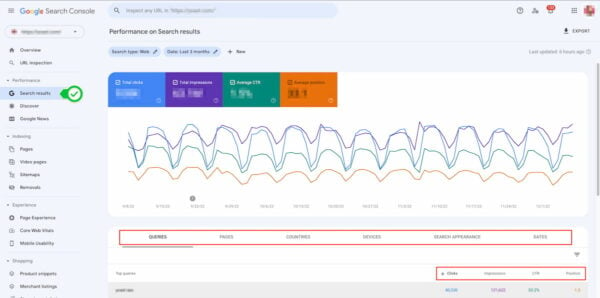
- Check the Search Performance report weekly.
- Analyze the URL Inspection Tool for errors.
- Verify the Coverage Report for indexing issues.
Address issues quickly to maintain a seamless user experience.
Staying Updated
Staying updated with Google Search Console is crucial. It helps you adapt to changes in search algorithms.
- Enable email notifications for important updates.
- Read the Search Console Help Center regularly.
- Follow the Google Webmasters Blog for the latest news.
Stay informed to keep your website optimized and compliant.
Credit: yoast.com
Conclusion And Next Steps
Google Search Console is a powerful tool for website owners. It’s essential for understanding how your site performs on Google. Let’s summarize key points and look at future strategies.
Summarizing Key Points
- Performance Reports: Track your site’s performance on Google Search.
- Index Coverage: Ensure all important pages are indexed.
- URL Inspection: Check the status of specific URLs.
- Sitemaps: Submit sitemaps to help Google find your pages.
- Security Issues: Identify and fix security problems.
Future Strategies
Focus on improving your site’s performance using these steps:
- Optimize Content: Use keywords effectively. Create high-quality content.
- Improve Site Speed: Fast-loading sites rank better. Use tools to test speed.
- Enhance Mobile Usability: Ensure your site works well on mobile devices.
- Fix Errors Promptly: Regularly check for errors and fix them quickly.
- Monitor Backlinks: Keep an eye on your backlinks. Disavow harmful links.
Use the insights from Google Search Console to make informed decisions. By following these strategies, you’ll see better rankings and increased traffic.
Frequently Asked Questions
What Is Google Search Console?
Google Search Console is a free tool by Google. It helps monitor and maintain your site’s presence in search results.
How Do I Use Google Search Console?
To use Google Search Console, sign up with your Google account. Add your website and verify ownership.
Why Is Google Search Console Important?
Google Search Console provides insights into your website’s performance. It helps identify issues and optimize your site for better search rankings.
How Do I Verify My Website On Google Search Console?
You can verify your website using HTML tags, Google Analytics, or DNS records. Follow the steps provided in Search Console.
Conclusion
Mastering Google Search Console is essential for improving your website’s SEO. Utilize its insights to boost your rankings. Regularly monitor your site’s performance for better results. Embrace these tools to stay ahead of competitors. Start optimizing your website today with Google Search Console for greater online success.


