
To use Google Analytics for marketing, set up tracking on your website and analyze the data to optimize campaigns. Focus on metrics like traffic sources, user behavior, and conversion rates.
Google Analytics is a powerful tool for marketers. It provides detailed insights into website performance. By tracking key metrics, you can understand how users interact with your site. This data helps you identify strengths and weaknesses in your marketing strategies.
You can adjust campaigns to target the right audience more effectively. Analyze traffic sources to see which channels drive the most visitors. Examine user behavior to improve the user experience and increase engagement. Conversion rates show how well your site turns visitors into customers. Using Google Analytics effectively can boost your marketing efforts and drive business growth.
Introduction To Google Analytics
Google Analytics is a powerful tool for marketing. It helps you understand your website traffic and user behavior. This tool offers valuable insights to boost your marketing strategies.
What Is Google Analytics?
Google Analytics is a web analytics service by Google. It tracks and reports website traffic. It provides data on how visitors interact with your site.
You can see which pages are most popular. You can also find out where your visitors come from. This data helps you make informed decisions.
Importance For Marketers
Google Analytics is essential for marketers. It shows you what works and what doesn’t. You can see which marketing campaigns drive the most traffic.
Here are some key benefits:
- Track user behavior on your site
- Identify your top-performing content
- Measure the success of marketing campaigns
- Understand your audience demographics
By using Google Analytics, you can optimize your marketing strategies. This leads to better results and higher ROI.
| Feature | Benefit |
|---|---|
| Real-time Data | See live user activity on your site |
| Audience Insights | Learn about your visitors’ demographics |
| Behavior Reports | Understand what users do on your site |
| Conversion Tracking | Measure the success of your campaigns |
Using these insights, you can tailor your content. You can also improve user experience and drive more conversions.

Credit: www.socialmediaexaminer.com
Setting Up Your Account
Using Google Analytics for marketing can transform your business. The first step is to set up your account. This process involves creating a Google Analytics account and installing a tracking code on your website.
Creating A Google Analytics Account
To create a Google Analytics account, follow these steps:
- Go to the Google Analytics website.
- Sign in with your Google account.
- Click on the “Start for free” button.
- Provide your account name and choose your data sharing settings.
- Click “Next” to proceed.
- Enter your property details like website name, URL, and time zone.
- Click “Create” to finish the setup.
Installing Tracking Code
After creating your account, you need to install the tracking code. This code collects data from your website.
Follow these steps to install the tracking code:
- Go to the Admin section in Google Analytics.
- Under the Property column, click on “Tracking Info.”
- Select “Tracking Code.”
- Copy the Global Site Tag (gtag.js) code.
- Paste this code into the
section of your website’s HTML.
If you use WordPress, you can use a plugin to add the tracking code. Popular plugins include:
- Insert Headers and Footers
- MonsterInsights
- Google Site Kit
Here is an example of the tracking code:
Global site tag (gtag.js) - Google Analytics
Replace UA-XXXXXX-X with your unique tracking ID. Ensure the code is placed correctly for accurate data.
Navigating The Dashboard
Using Google Analytics can seem overwhelming at first. The dashboard is where you’ll find all your data. Let’s dive into the key features and how you can customize your dashboard.
Key Features
The Google Analytics dashboard displays vital information. Here are some key features:
- Real-Time Data: See live visitor activity on your site.
- Audience Overview: Understand your users’ demographics.
- Acquisition Reports: Track where your traffic comes from.
- Behavior Reports: Analyze user behavior on your site.
- Conversion Tracking: Measure goal completions and sales.
These features help you monitor and improve your marketing strategies.
Customizing Your Dashboard
Customizing your dashboard tailors it to your needs. Follow these steps:
- Create a New Dashboard: Click on “Customization” and select “Dashboards”.
- Add Widgets: Use widgets to display key metrics.
- Set Up Alerts: Get notified about important changes.
- Save and Share: Save your dashboard and share it with your team.
Custom dashboards make your data easy to access and understand. This helps you focus on the most important metrics for your marketing goals.
| Feature | Description |
|---|---|
| Real-Time Data | View live user activity. |
| Audience Overview | Analyze user demographics. |
| Acquisition Reports | Track traffic sources. |
| Behavior Reports | Understand user actions. |
| Conversion Tracking | Measure sales and goals. |
Use these features to make data-driven marketing decisions.

Credit: engaiodigital.com
Tracking Website Traffic
Tracking website traffic is essential for any marketing strategy. It helps you understand how users interact with your site. Google Analytics is a powerful tool for this purpose. With it, you can gain insights that will improve your marketing efforts.
Analyzing Traffic Sources
To understand where your visitors come from, check the traffic sources report. This report breaks down your traffic by channels. Channels include organic search, direct traffic, referrals, and social media.
| Channel | Description |
|---|---|
| Organic Search | Visitors from search engines like Google. |
| Direct Traffic | Visitors who type your URL directly. |
| Referrals | Visitors from other websites linking to yours. |
| Social Media | Visitors from social media platforms. |
Understanding User Behavior
To optimize your site, you need to know what users do on it. Google Analytics offers several reports to help you with this.
- Behavior Flow: Shows the path users take on your site.
- Site Content: Lists the most visited pages.
- Events: Tracks specific actions like clicks or downloads.
By analyzing these reports, you can identify popular content. You can also find areas needing improvement. This data is crucial for making informed decisions.
Measuring Marketing Campaigns
Measuring marketing campaigns is crucial for understanding their impact and effectiveness. Google Analytics provides powerful tools to track and analyze your marketing efforts. This section will guide you through setting up campaigns and tracking their performance.
Setting Up Campaigns
To begin, create a new campaign in Google Analytics. Use the Campaign URL Builder to generate URLs with UTM parameters. These parameters help identify the source, medium, and name of your campaign.
Here is a simple table to understand the UTM parameters:
| Parameter | Purpose |
|---|---|
utm_source |
Identifies the source of traffic (e.g., Google, Facebook) |
utm_medium |
Identifies the medium (e.g., email, CPC) |
utm_campaign |
Names the campaign (e.g., summer_sale) |
For example, a URL might look like this:
https://example.com/?utm_source=google&utm_medium=cpc&utm_campaign=summer_sale
Tracking Campaign Performance
After setting up your campaigns, navigate to the Acquisition section in Google Analytics. Here, select Campaigns to view performance data.
Look for key metrics such as:
- Sessions: The number of visits generated by the campaign.
- Bounce Rate: The percentage of visitors who leave immediately.
- Conversions: The number of desired actions taken by visitors.
Use these metrics to evaluate your campaign’s effectiveness. Adjust your strategies based on the data. For example, if the bounce rate is high, refine your landing page.
To gain deeper insights, create custom reports. Go to the Customization tab and select Custom Reports. Here, you can tailor reports to focus on specific metrics and dimensions.
Regularly monitoring these reports helps in optimizing your marketing efforts. Ensure your campaigns are continually improving and delivering desired results.
Utilizing Conversion Tracking
Google Analytics is a powerful tool for marketers. One of its key features is Conversion Tracking. This helps businesses measure their success. Below, we will explore how to set up and analyze conversions.
Setting Up Goals
Goals help you track specific actions on your website. These actions might include form submissions, purchases, or newsletter sign-ups. Follow these steps to set up goals:
- Sign in to your Google Analytics account.
- Navigate to the Admin panel.
- Select the desired view and click on Goals.
- Click on New Goal and choose a goal template.
- Define the goal description and details.
- Save your goal settings.
Now, your goals are set up. You can start tracking specific user actions.
Analyzing Conversion Data
Once goals are set, you can analyze your conversion data. This helps you understand user behavior and campaign performance.
To analyze conversion data, follow these steps:
- Go to the Conversions tab in Google Analytics.
- Select Goals and then Overview.
- Review the goal completions and conversion rates.
- Look at the source/medium report to see which channels drive conversions.
- Analyze the behavior flow to understand the user journey.
You can use this data to optimize your marketing efforts. For example, you might find that social media drives more conversions than email campaigns. You can then focus more on social media marketing.
Advanced Analytics Techniques
Understanding advanced analytics techniques in Google Analytics can supercharge your marketing efforts. These techniques provide deeper insights, enabling more informed decision-making. Let’s explore some key methods to enhance your analytics capabilities.
Using Segments
Segments allow you to isolate specific types of traffic on your website. You can create segments based on user behavior, demographics, or traffic sources. This helps you understand different user groups better.
For example, you can create a segment for mobile users to see how they interact with your site compared to desktop users. This way, you can optimize the mobile experience if needed.
Another useful segment is the new vs. returning users. This helps you see how new visitors engage versus those who have visited before. You can adjust your marketing strategies based on these insights.
Custom Reports And Dashboards
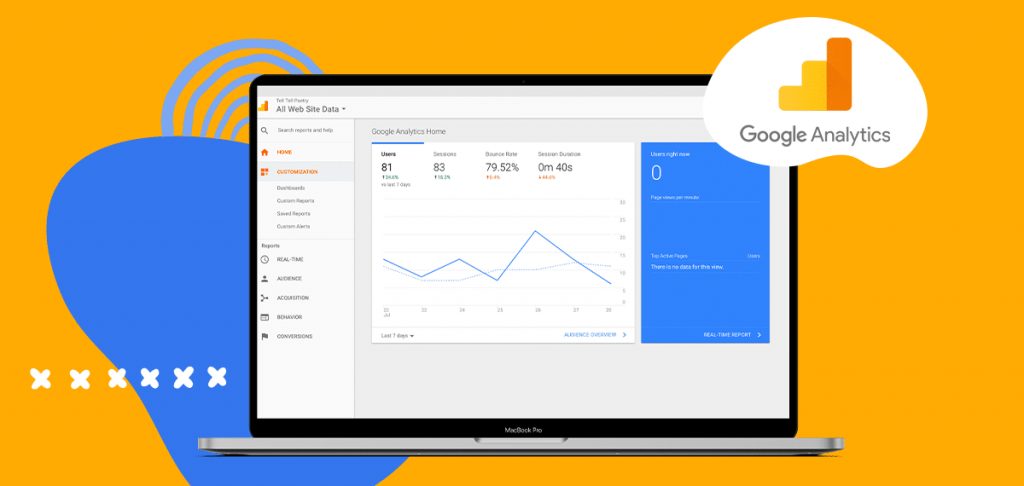
Creating custom reports and dashboards in Google Analytics helps you focus on the metrics that matter most to your business. You can tailor these tools to display the data that aligns with your marketing goals.
To build a custom report, navigate to the “Customization” tab and select “Custom Reports”. Choose the dimensions and metrics that are important for your analysis. For example, you can create a report that tracks conversion rates from different traffic sources.
Dashboards offer a visual snapshot of your key metrics. Create a dashboard by going to the “Customization” tab and selecting “Dashboards”. Add widgets to display data such as real-time traffic, goal completions, and user demographics.
| Feature | Benefit |
|---|---|
| Segments | Isolate specific user groups |
| Custom Reports | Track tailored metrics |
| Dashboards | Visualize key data quickly |
By leveraging these advanced techniques, you can gain a deeper understanding of your audience and improve your marketing strategies.
Credit: rockcontent.com
Integrating With Other Tools
Integrating Google Analytics with other tools can enhance your marketing strategy. This integration provides a more holistic view of your data, making your campaigns more effective.
Google Ads Integration
Google Ads Integration with Google Analytics is vital for marketers. This integration lets you track ad performance and user behavior on your site. By linking these tools, you get insights into which ads drive the most traffic and conversions.
Follow these steps to integrate Google Ads with Google Analytics:
- Go to your Google Analytics account.
- Click on Admin.
- Select Google Ads Linking under the Property column.
- Click on + New Link Group.
- Select the Google Ads account you want to link.
- Click Continue and then Link accounts.
This integration allows you to track which keywords are most effective. You can also see user behavior after they click on your ads. This data helps you refine your ad strategy and allocate your budget more effectively.
Connecting With Crm Systems
Connecting Google Analytics with your CRM system can provide deeper insights into your customers. This integration enables you to track the entire customer journey, from lead generation to conversion.
Here are the steps to connect Google Analytics with a CRM system:
- Choose a CRM that supports Google Analytics integration.
- Go to your CRM settings.
- Find the section for third-party integrations.
- Select Google Analytics and follow the prompts to link your account.
- Set up tracking codes on your website and CRM forms.
This connection allows you to see how leads interact with your site. You can track which marketing channels generate the most valuable leads. This data helps you optimize your campaigns for better results.
Integrating Google Analytics with other tools is essential for a comprehensive marketing strategy. These integrations provide valuable insights, helping you to make data-driven decisions and improve your marketing efforts.
Tips For Maximizing Impact
Google Analytics is a powerful tool for marketers. It helps track user behavior and campaign performance. To get the most out of it, follow these tips for maximizing impact. Regular monitoring and actionable insights are key.
Regular Monitoring
Regular monitoring of your Google Analytics data is crucial. Check your analytics at least once a week. This helps you stay updated on trends and changes.
- Daily Traffic: Look at daily traffic to spot patterns.
- Source Analysis: Check where your traffic comes from.
- Bounce Rate: Monitor bounce rates to improve user engagement.
Use custom alerts in Google Analytics. They notify you of significant changes. Set alerts for spikes or drops in traffic.
Actionable Insights
Focus on actionable insights from your data. Identify areas for improvement.
- Content Performance: Review which pages get the most views.
- User Behavior: Analyze user flow to see how visitors navigate.
- Conversion Rates: Monitor conversion rates to gauge success.
| Metric | Action |
|---|---|
| High Bounce Rate | Improve page content and load time |
| Low Conversion Rate | Optimize landing pages and CTAs |
| Traffic Sources | Focus on high-performing channels |
Use segmentation to drill down into specific data sets. Compare different segments to find growth opportunities. Make data-driven decisions to enhance your marketing strategy.
Frequently Asked Questions
What Is Google Analytics Used For?
Google Analytics helps track and analyze website traffic. It provides valuable insights into user behavior and marketing effectiveness.
How Can Google Analytics Improve Marketing?
Google Analytics can identify which marketing campaigns drive the most traffic. It helps optimize strategies for better engagement and conversions.
How Do You Set Up Google Analytics?
To set up Google Analytics, create an account, add your website, and install the tracking code. Then, start collecting data.
What Are Key Metrics In Google Analytics?
Key metrics include page views, bounce rate, session duration, and conversion rate. These metrics help evaluate your website’s performance.
Conclusion
Mastering Google Analytics can boost your marketing efforts. Analyze data to understand user behavior. Use insights to refine strategies and improve results. Consistently monitor metrics to stay ahead. Implement these tips and watch your marketing success grow. Start leveraging Google Analytics today for better marketing outcomes.