

User Experience (UX) Design focuses on creating products that provide meaningful and relevant experiences to users. It involves understanding user needs and enhancing usability and accessibility.
UX Design is crucial in today’s digital age. It ensures products are user-friendly and intuitive. Designers must empathize with users to create effective solutions. This process includes research, prototyping, and testing. Good UX Design improves customer satisfaction and loyalty. It also boosts business success by reducing costs and increasing revenue.
UX Design encompasses various elements like information architecture, interaction design, and visual design. Collaboration among designers, developers, and stakeholders is essential. Continuous iteration and feedback are key to successful UX Design. It is a dynamic and evolving field that adapts to user behavior and technological advancements.
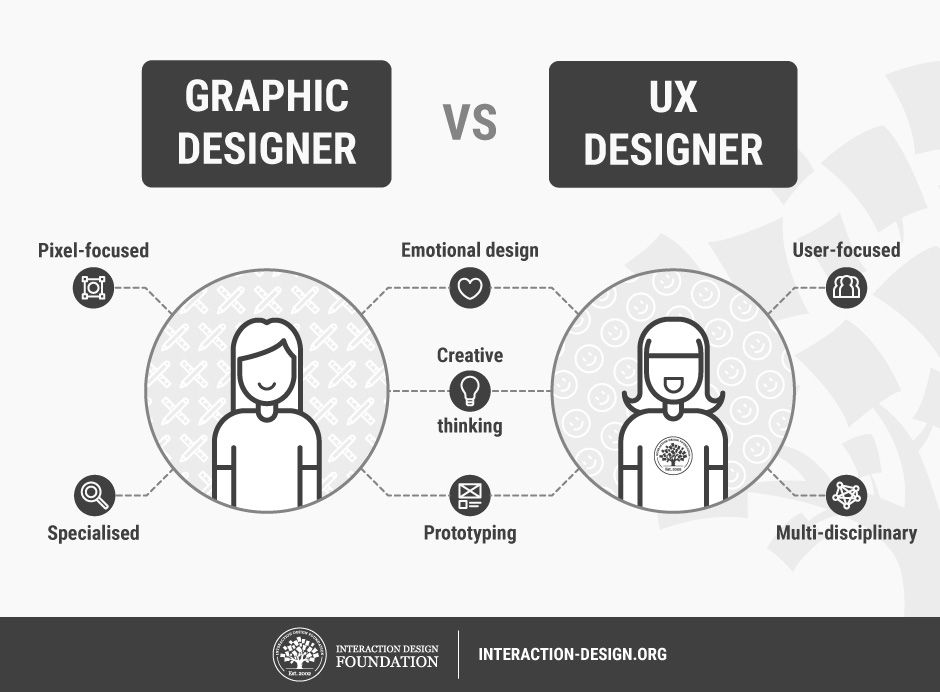
Credit: www.interaction-design.org
Introduction To Ux Design
User Experience (UX) Design focuses on creating products that provide meaningful and relevant experiences to users. It encompasses the entire process of acquiring and integrating a product, including aspects of branding, design, usability, and function. UX design is crucial for businesses aiming to attract and retain users.
Importance Of Ux
Good UX design ensures that users find value in what you’re providing. It makes products easy to use, enhancing user satisfaction. Poor UX can drive users away, leading to loss of revenue.
Here are some key reasons why UX is important:
- Improved User Satisfaction: Users enjoy using the product.
- Increased Engagement: A good design keeps users engaged.
- Higher Conversion Rates: Effective UX can lead to more sales.
- Customer Loyalty: Satisfied users are more likely to return.
Key Principles
Understanding the key principles of UX design helps in creating effective designs. These principles ensure that the product is user-friendly.
| Principle | Description |
|---|---|
| Usability | The product must be easy to use and navigate. |
| Accessibility | All users, including those with disabilities, should use the product. |
| Consistency | Maintain a uniform design throughout the product. |
| Feedback | Provide users with clear feedback on their actions. |
| Visual Hierarchy | Organize information to guide users’ attention. |
Following these principles can significantly improve user experience. They help in creating products that users love to interact with.
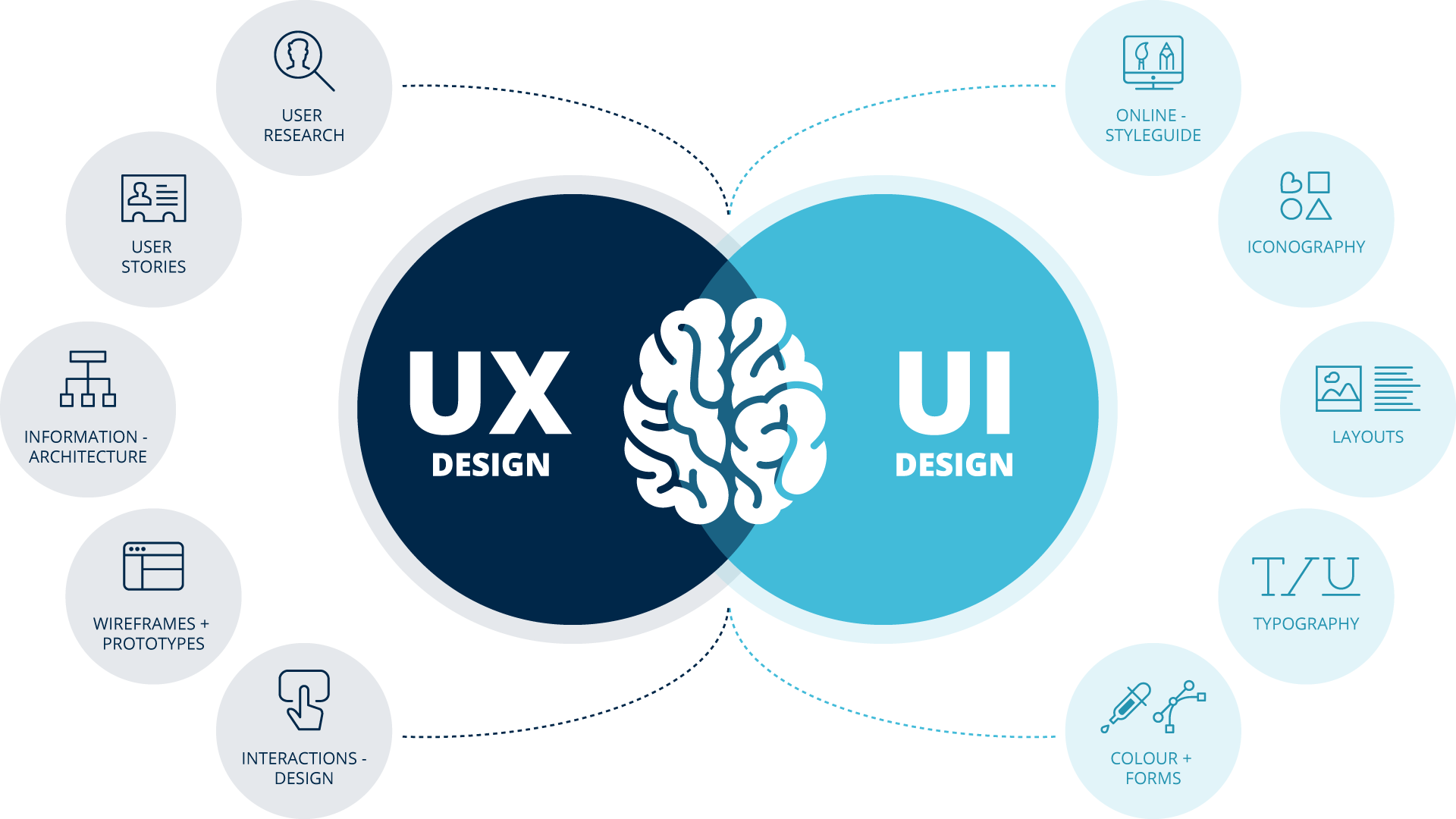
Credit: www.arvato-systems.com
Understanding User Needs
To create a great user experience, you must understand user needs. This helps you design products that solve real problems. Let’s explore some methods to gather and analyze user needs.
User Research Methods
There are various user research methods to understand user needs. These methods help you collect valuable data.
- Interviews: One-on-one conversations to gather deep insights.
- Surveys: Online forms to collect data from many users.
- Focus Groups: Group discussions to explore user opinions.
- Usability Testing: Observing users while they use your product.
Each method has its strengths and weaknesses. Choose the right method based on your goals and resources.
Creating User Personas
After gathering data, you can create user personas. A user persona is a fictional character that represents a user group.
| Attribute | Details |
|---|---|
| Demographics | Age, gender, occupation, and location |
| Goals | What the user wants to achieve |
| Pain Points | Challenges the user faces |
| Behavior | How the user interacts with your product |
Use these personas to guide your design decisions. They help you create a product that meets user needs.
Designing For Engagement
User Experience Design (UX) is more than just aesthetics. It’s about creating an engaging and intuitive experience for users. By designing for engagement, we can ensure that users find our website or app enjoyable and easy to use. This involves focusing on various elements that capture attention and encourage interaction.
Interactive Elements
Interactive elements are crucial for user engagement. These elements invite users to participate actively. Examples include buttons, forms, and clickable images. Each element should be easy to find and use.
- Buttons: Make buttons stand out with contrasting colors.
- Forms: Keep forms short and straightforward.
- Clickable Images: Use images that invite clicks for more information.
Interactive elements should guide users through the desired actions. Use animations and transitions to make interactions smooth and pleasant.
Visual Appeal
Visual appeal greatly influences user engagement. A well-designed interface attracts users and keeps them interested. Ensure your design is clean and uncluttered.
| Element | Description |
|---|---|
| Colors | Use a harmonious color palette. |
| Typography | Choose readable fonts with appropriate sizes. |
| Images | Incorporate high-quality and relevant images. |
Consistency in visual elements creates a cohesive look. This helps users feel comfortable and reduces cognitive load.
Enhancing User Satisfaction
Enhancing user satisfaction is a key goal in User Experience Design (UX). It involves making the user’s journey easy and delightful. This can lead to higher user engagement and retention. Two critical components of enhancing user satisfaction are usability testing and feedback implementation.
Usability Testing
Usability testing helps identify issues that users face while interacting with a product. It is a process of evaluating a product by testing it with real users. This method helps designers understand how users interact with the interface.
During usability tests, users complete tasks while observers note any difficulties. This information is invaluable for improving user satisfaction. A successful usability test can highlight problems and provide insights into user behavior.
Here are some key steps in usability testing:
- Define the goals of the test.
- Select participants who represent the target audience.
- Create tasks that reflect real user activities.
- Observe and record the users’ interactions.
- Analyze the results to find patterns and issues.
Feedback Implementation
Feedback implementation is crucial for enhancing user satisfaction. Gathering feedback helps designers understand users’ needs and preferences. It involves collecting, analyzing, and acting on user feedback.
There are various ways to collect feedback:
- Surveys and questionnaires.
- User interviews.
- Feedback forms on the website.
- Social media comments.
- Customer support interactions.
Once feedback is collected, it must be analyzed to find common themes. This analysis helps identify which changes will most improve user satisfaction. Implementing these changes shows users that their opinions matter.
Here’s a simple table to illustrate the feedback implementation process:
| Step | Description |
|---|---|
| Collect Feedback | Use surveys, interviews, and forms to gather user input. |
| Analyze Feedback | Identify common themes and prioritize issues. |
| Implement Changes | Make improvements based on user feedback. |
| Review | Test changes to ensure they enhance user satisfaction. |
Information Architecture
Information Architecture (IA) is the backbone of User Experience Design. It involves organizing and structuring content for users. A well-structured IA makes a website user-friendly and easy to navigate. It helps users find information quickly. Proper IA ensures users stay longer on the site.
Organizing Content
Organizing content is crucial for a good user experience. Divide information into clear, distinct sections. Use headings, subheadings, and bullet points. This makes the content scannable and easy to read.
Create a logical hierarchy for your content. Start with broad categories and then narrow down to specific topics. This helps users understand the structure of the site.
- Use clear and descriptive labels.
- Group related content together.
- Avoid jargon and complex terms.
Use these tips to enhance content organization. A well-organized site is easier to use and navigate.
Navigation Design
Navigation design is a key part of Information Architecture. It guides users through the site. Good navigation helps users find what they need quickly.
Use a simple and consistent navigation menu. Place it at the top or side of the page. This is where users expect to find it.
- Use clear and concise labels for menu items.
- Limit the number of menu items to 7 or fewer.
- Include a search bar for easy access to information.
Designing intuitive navigation is essential for a positive user experience. Follow these guidelines for effective navigation design.
| Best Practices | Benefits |
|---|---|
| Consistent Menu Placement | Improves User Familiarity |
| Clear Labels | Reduces User Confusion |
| Search Bar | Quick Access to Information |
By focusing on organizing content and navigation design, you can create a user-friendly website. This improves user satisfaction and engagement.
Mobile Ux Considerations
Mobile UX is crucial for a positive user experience. Users want apps to be easy and smooth. Two key areas are Responsive Design and Touch Interface.
Responsive Design
Responsive design means your app works on all devices. From small phones to large tablets, the layout must adapt. This ensures users always have a good experience.
Key points to remember:
- Use flexible grids and layouts.
- Images should resize automatically.
- Text must remain readable at any size.
Here is a quick example of a responsive design code:
    .container {
        width: 100%;
        max-width: 1200px;
        margin: 0 auto;
    }

    @media (max-width: 768px) {
        .container {
            padding: 10px;
        }
    }
Touch Interface
Touch interface is about making sure touch actions work well. Users interact with their fingers, not a mouse. This means buttons should be big enough to tap.
Consider these aspects:
- Buttons should be at least 44px by 44px.
- Ensure enough space between touch targets.
- Use gestures like swipe and pinch.
Below is an example of a touch-friendly button:
    .button {
        width: 100px;
        height: 44px;
        padding: 10px;
        font-size: 16px;
    }
Ensuring a seamless mobile UX will keep users happy and engaged. Pay attention to these details for a successful app.
Accessibility In Ux
Accessibility in User Experience (UX) design focuses on creating products that everyone can use. This includes people with disabilities. Ensuring accessibility means considering all users.
Inclusive Design
Inclusive design means building products that work for the widest range of people. This includes users with different abilities and needs. It is about designing for all.
To create an inclusive design, follow these steps:
- Understand your users’ needs.
- Consider different disabilities.
- Test your design with real users.
Compliance Standards
Compliance standards help ensure products meet accessibility guidelines. These standards are crucial in UX design.
| Standard | Description |
|---|---|
| WCAG | Web Content Accessibility Guidelines |
| ADA | Americans with Disabilities Act |
| Section 508 | U.S. federal accessibility standards |
Meeting these standards ensures your design is accessible to all.
Future Trends In Ux
The world of User Experience Design (UX) is ever-evolving. New technologies shape the way users interact with digital products. Looking ahead, several trends promise to revolutionize UX. Let’s explore some exciting future trends in UX.
Ai Integration
Artificial Intelligence (AI) is transforming UX design. AI can analyze large amounts of user data. This helps create more intuitive designs. AI-powered chatbots offer instant customer support. This improves user satisfaction.
AI also aids in automating repetitive tasks. This allows designers to focus on creativity. Predictive analytics can foresee user needs. This results in a smoother user journey.
| AI Feature | Benefit |
|---|---|
| Chatbots | 24/7 customer support |
| Predictive Analytics | Understanding user behavior |
| Automation | Saving time for designers |
Personalization
Personalization is crucial in modern UX design. Users expect tailored experiences. This makes them feel valued. Personalized content increases user engagement.
Designers can use data to create custom experiences. This includes personalized recommendations and content. For example:
- Music apps suggesting songs based on user preferences.
- E-commerce sites recommending products based on past purchases.
- News apps curating articles based on reading history.
Personalization enhances user loyalty. Users are more likely to return to a platform. This is because it meets their unique needs.

Credit: www.acquisition-international.com
Frequently Asked Questions
What Is User Experience Design?
User Experience Design (UX) focuses on improving user satisfaction by enhancing usability, accessibility, and interaction. It involves understanding user needs and creating intuitive interfaces.
Why Is Ux Design Important?
UX Design improves user satisfaction, increases engagement, and boosts conversions. A well-designed user experience can lead to higher customer retention and loyalty.
What Are Key Principles Of Ux Design?
Key principles include usability, accessibility, consistency, and user-centricity. These principles ensure the product is easy to use, accessible to all, and meets user needs.
How Does Ux Design Impact Business?
Good UX Design can significantly enhance customer satisfaction and loyalty. It leads to higher engagement, better conversion rates, and a competitive edge.
Conclusion
Crafting an exceptional User Experience (UX) design is key to user satisfaction. Prioritize simplicity, functionality, and user needs. Effective UX design enhances engagement, retention, and overall success. Embrace user feedback and continuous improvement. Stay ahead by keeping user experience at the heart of your design process.