
To set up Facebook Ads, create a Facebook Ads Manager account, then choose your campaign objective. Design your ad, set your budget, and target your audience.
Facebook Ads offer a powerful way to reach potential customers. Businesses of all sizes can benefit from this advertising platform. Facebook provides various targeting options to ensure your ads reach the right audience. Start by defining your campaign objective, which could be anything from brand awareness to conversions.
Next, create engaging ad content that resonates with your target demographic. Setting a budget and schedule is crucial for managing costs and maximizing ROI. Finally, monitor your ad performance and make necessary adjustments. This approach ensures your ads are effective and contribute to your business goals.
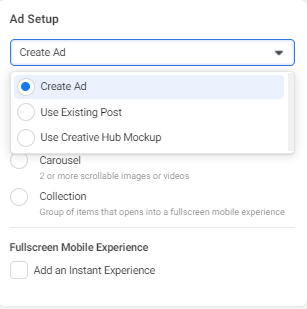
Credit: adespresso.com
Introduction To Facebook Ads
Facebook Ads are a powerful tool for businesses. They help connect with potential customers. In this guide, learn the basics of Facebook Ads. Discover how to set up effective campaigns.
Importance Of Facebook Ads
Facebook Ads are crucial for online marketing. They offer a platform to reach a large audience. Here are some key reasons why:
- Wide Reach: Facebook has over 2.8 billion active users.
- Targeted Advertising: Ads can be shown to specific groups.
- Cost-Effective: You control your budget and ad spend.
- Measurable Results: Track your ad performance easily.
Benefits For Businesses
Facebook Ads provide numerous benefits for businesses. They can boost brand awareness, drive traffic, and increase sales. Here are the main advantages:
| Benefit | Description |
|---|---|
| Enhanced Targeting | Ads reach specific demographics and interests. |
| Customizable Campaigns | Adjust ads to fit your business goals. |
| Real-Time Analytics | Monitor ad performance and make adjustments. |
| Increased Engagement | Interactive ads can boost user interaction. |
Creating A Facebook Business Page
Setting up a Facebook Business Page is essential for online marketing. It allows you to connect with your audience and promote your business. Follow these steps to create and optimize your Facebook Business Page for maximum engagement.
Setting Up Your Page
To start, log in to your Facebook account. Navigate to the Create Page section. You can find this option under the menu. Click on Create Page and choose the type of page you want. Typically, businesses select Business or Brand.
Next, fill in your business details. Provide your Page Name and Category. Choose a category that best describes your business. For example, if you run a bakery, you could choose Bakery or Dessert Shop. After entering your details, click Continue.
Upload a profile picture that represents your business. This could be your logo or a recognizable image. Then, upload a cover photo. This larger image should visually convey your brand. Click Save and your page is created!
Optimizing Your Profile
Now, it’s time to optimize your profile. Start by filling out the About section. Provide a short description of your business. Use keywords that your audience might search for. This helps with SEO and makes your page more discoverable.
Next, add your contact information. Include your phone number, email, and website URL. Ensure this information is accurate. This allows customers to easily reach you.
Utilize the Call to Action button. This button can direct users to take a specific action. Options include Contact Us, Shop Now, or Sign Up. Choose one that aligns with your business goals.
| Section | Action |
|---|---|
| Page Info | Fill out name, category, and details |
| Profile Picture | Upload a logo or recognizable image |
| Cover Photo | Upload a visually appealing image |
| About Section | Provide a short, keyword-rich description |
| Contact Info | Include phone, email, and website URL |
| Call to Action | Set up a CTA button |
Finally, keep your page active. Post updates regularly. Engage with your audience by responding to comments and messages. This keeps your audience interested and improves your page’s visibility.
Understanding Facebook Ad Types
Setting up Facebook Ads requires understanding various ad types. Each ad type serves different purposes. Selecting the right type is crucial for successful campaigns.
Ad Formats Overview
Facebook offers multiple ad formats to suit different needs:
- Image Ads: Simple and effective for visual content.
- Video Ads: Engage users with dynamic content.
- Carousel Ads: Showcase multiple images or videos in a single ad.
- Slideshow Ads: Create lightweight video-like ads using images.
- Collection Ads: Feature a cover image or video followed by product images.
- Instant Experience Ads: Full-screen ads designed for mobile devices.
Choosing The Right Ad Type
Consider your campaign goals before choosing an ad type. Here’s a quick guide:
| Goal | Recommended Ad Type |
|---|---|
| Brand Awareness | Video Ads, Image Ads |
| Engagement | Carousel Ads, Video Ads |
| Lead Generation | Slideshow Ads, Collection Ads |
| Conversions | Instant Experience Ads, Carousel Ads |
For brand awareness, video ads and image ads are effective. Engagement campaigns benefit from carousel ads and video ads. For lead generation, slideshow ads and collection ads work well. When focusing on conversions, use instant experience ads and carousel ads.
Setting Up Your Ad Account
Setting up your Facebook ad account is the first step towards advertising success. This process ensures your ads run smoothly and reach the right audience. Follow the steps below to create and manage your ad account effectively.
Creating An Ad Account
To start, log in to your Facebook account. Go to the Ads Manager. Click on the Create button.
Follow these steps:
- Select your Ad Account from the list.
- Choose your Ad Account Name.
- Set your Time Zone and Currency.
- Click Create Ad Account.
Your ad account is now ready for use.
Billing And Payment Options
Next, set up your billing information. Go to the Payment Settings in Ads Manager.
Follow these steps:
- Click on Add Payment Method.
- Choose your Payment Method (Credit Card, PayPal, etc.).
- Enter your payment details and click Save.
Here’s a quick view of the payment methods:
| Payment Method | Accepted |
|---|---|
| Credit/Debit Card | Yes |
| PayPal | Yes |
| Bank Transfer | No |
Once your payment method is set, you can start running ads without any hassle.
Defining Your Campaign Objective
Setting up Facebook Ads can be tricky. The first step is to define your campaign objective. This goal will drive your ad’s success. Choose the right objective to reach your target audience. Let’s explore how to do this effectively.
Types Of Campaign Objectives
Facebook offers various campaign objectives. Each serves a unique purpose. Here are the main types:
- Awareness
- Brand Awareness
- Reach
- Consideration
- Traffic
- Engagement
- App Installs
- Video Views
- Lead Generation
- Messages
- Conversion
- Conversions
- Catalog Sales
- Store Traffic
Selecting The Right Objective
Choosing the right objective is crucial. It impacts your ad performance. Here are steps to select the best one:
- Identify your business goal. Is it awareness, consideration, or conversion?
- Match your goal with Facebook’s objectives.
- Consider your audience’s stage in the buying journey.
- Analyze past campaigns for insights.
- Test different objectives and measure results.
Here is a quick reference table:
| Business Goal | Facebook Objective |
|---|---|
| Increase brand recognition | Brand Awareness, Reach |
| Drive website traffic | Traffic |
| Boost post engagement | Engagement |
| Gather leads | Lead Generation |
| Generate sales | Conversions, Catalog Sales |
By following these steps, you can set up effective Facebook Ads. Define your campaign objective clearly. Choose the right one to meet your business goals.
Targeting Your Audience
Setting up Facebook Ads can be a game-changer for your business. One of the most crucial steps is targeting your audience. Without proper targeting, your ads might not reach the right people. This can waste your budget and reduce your ROI. Let’s dive into how you can target your audience effectively.
Demographic Targeting
Demographic targeting allows you to reach people based on their age, gender, location, and language. Here are some key points to consider:
- Age: Choose an age range that fits your product or service.
- Gender: Decide if your product is more suited for men, women, or both.
- Location: Target specific countries, cities, or even zip codes.
- Language: Ensure your ad speaks the language of your audience.
Here’s an example of demographic targeting:
| Criteria | Example |
|---|---|
| Age | 25-45 years old |
| Gender | Female |
| Location | New York City |
| Language | English |
Interest And Behavior Targeting
Interest and behavior targeting helps you reach people based on their interests and online behavior. This type of targeting can be very effective. Here are some examples:
- Interests: Choose interests related to your product. Examples include sports, cooking, or technology.
- Behavior: Target people based on their actions. Examples include online shopping, travel habits, or device usage.
Using interest and behavior targeting can make your ads more relevant. This increases the chances of engagement and conversions.
By combining demographic and interest and behavior targeting, you can create a highly specific audience. This will make your Facebook Ads more effective and efficient.
Creating Ad Content
Creating engaging ad content is crucial for successful Facebook Ads. Effective ads attract users, hold their attention, and drive clicks. Let’s dive into the essentials of crafting compelling ad content.
Writing Ad Copy
Your ad copy must be clear and concise. Use simple words that everyone understands. Highlight the benefits of your product or service. Address your audience’s needs directly.
- Be direct: Use short sentences and active voice.
- Use power words: Words like “free”, “exclusive”, and “limited time” grab attention.
- Include a CTA: Encourage users to take action. Examples: “Buy Now”, “Learn More”.
Avoid jargon or complex terms. Your goal is to be understood by all. Test different versions of your copy to see what works best.
Designing Ad Visuals
Visuals play a vital role in Facebook Ads. They capture attention and convey your message quickly. Use high-quality images or videos that relate to your product.
- Use bright colors: They stand out in the feed.
- Show real people: Faces create an emotional connection.
- Keep it simple: Avoid cluttered designs. Focus on one main element.
Ensure your visual aligns with your brand’s style. Consistency builds trust and recognition. Use tools like Canva or Adobe Spark for designing.
| Aspect | Best Practice |
|---|---|
| Image Size | 1200 x 628 pixels |
| Video Length | 15-30 seconds |
| Text Limit | 20% of the image |
Test different visuals to see what resonates best. Keep track of performance and adjust accordingly. Engaging visuals can significantly boost your ad’s success.
Setting Your Budget And Schedule
Setting your budget and schedule is crucial for Facebook Ads success. It helps control your spending and ensures your ads run effectively. Facebook offers various options to fit different needs and goals.
Daily Vs. Lifetime Budget
Choosing between a daily budget and a lifetime budget depends on your ad strategy. The daily budget sets a limit for each day. It ensures consistent spending and ad delivery. The lifetime budget spreads your budget over the entire campaign period.
Here’s a quick comparison:
| Daily Budget | Lifetime Budget |
|---|---|
| Fixed daily spend | Spend over total campaign period |
| Consistent ad delivery | Flexible spending pace |
| Adjustable anytime | Set and forget |
Choosing Ad Duration
Choosing the right ad duration is essential. It affects your campaign’s reach and effectiveness. Consider these factors:
- Ad objectives
- Target audience behavior
- Campaign budget
Follow these steps to set your ad duration:
- Go to your Facebook Ads Manager.
- Select your ad campaign.
- Choose the start and end dates.
- Review and confirm your settings.
Setting a clear schedule helps maximize your ad performance.
Launching Your Ad Campaign
Launching your ad campaign on Facebook is an exciting step. You’ve designed your ad, chosen your audience, and set your budget. Now, it’s time to review and publish. This guide will help you with the final steps.
Reviewing Ad Settings
Before hitting the publish button, review your ad settings. Ensuring everything is correct will save you from potential issues.
| Setting | Description |
|---|---|
| Ad Creative | Check your images, text, and CTA. They should align with your goals. |
| Audience | Make sure your target audience is set correctly. This includes age, location, and interests. |
| Budget | Verify your daily or lifetime budget. Ensure it fits your marketing plan. |
| Schedule | Confirm the start and end dates. You can also choose specific times of the day. |
Publishing Your Ad
Once you are satisfied with the settings, you are ready to publish.
- Click the Review button to double-check everything.
- Click the Confirm button to finalize your ad.
- Your ad will go through a review process. This usually takes 24 hours.
After approval, your ad will start running at the scheduled time. Monitor its performance and make adjustments as needed.
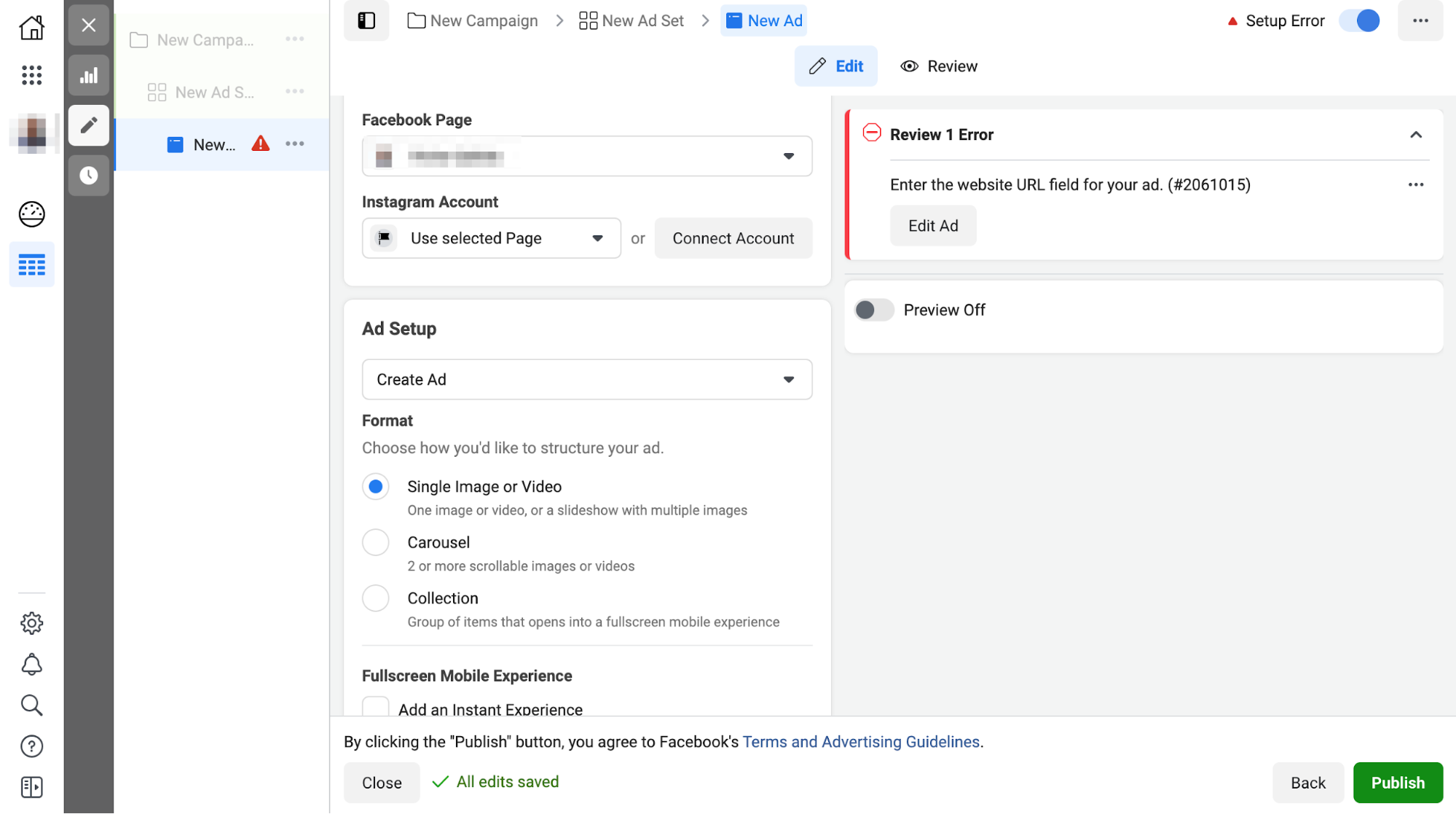
Credit: www.getresponse.com
Monitoring And Analyzing Performance
Once your Facebook Ads are live, it’s crucial to monitor and analyze their performance. This ensures your ads are effective and reaching the right audience. By keeping an eye on key metrics, you can adjust your strategy for better results.
Key Metrics To Track
Tracking the right metrics is essential. Here are some important ones:
- Click-Through Rate (CTR): This measures how many people click on your ad. A higher CTR means your ad is engaging.
- Conversion Rate: This shows the percentage of visitors who completed a desired action. For example, making a purchase.
- Cost Per Click (CPC): This tells you how much you pay when someone clicks on your ad. Lower CPC means more cost-efficient ads.
- Return on Ad Spend (ROAS): This metric measures the revenue generated for every dollar spent on ads. Higher ROAS indicates better ad performance.
Adjusting Your Strategy
Adjusting your ad strategy based on performance metrics is vital. Here’s how you can do it:
- Analyze your CTR and CPC. If CTR is low, try changing your ad copy or images.
- Look at your conversion rates. If conversions are low, check your landing page or offer.
- Evaluate your ROAS. If it’s not meeting expectations, consider reallocating your budget to better-performing ads.
Use these insights to make data-driven decisions. This helps in optimizing your Facebook Ads for better results.
Advanced Tips And Strategies
Unlocking the full potential of Facebook Ads requires mastering advanced techniques. These strategies can significantly enhance your campaign performance. In this section, we explore some of the best advanced tips.
A/b Testing
A/B testing, or split testing, is essential for optimizing Facebook Ads. It involves comparing two versions of an ad to see which performs better.
- Create multiple ad variations: Test different headlines, images, and calls to action.
- Analyze performance metrics: Focus on metrics such as CTR (Click-Through Rate) and conversion rate.
- Run tests simultaneously: Ensure both versions run at the same time to avoid external influences.
Retargeting Campaigns
Retargeting campaigns allow you to reach users who have already interacted with your brand. This strategy can improve conversion rates.
| Retargeting Strategy | Benefit |
|---|---|
| Website Visitors | Target users who visited your site but didn’t convert. |
| Engaged Users | Target users who engaged with your posts or page. |
| Cart Abandonment | Target users who added items to their cart but didn’t purchase. |
Use custom audiences to build retargeting lists. Track user interactions with Facebook Pixel for better targeting.
By implementing these advanced tips and strategies, you can elevate your Facebook Ads to the next level.
Conclusion And Next Steps
Setting up Facebook Ads can seem complex. You’ve learned the essential steps. Now it’s time to review and plan for future campaigns.
Recap Of Key Points
Here’s a quick recap of what you’ve learned:
- Create a clear objective for your ad campaign.
- Identify and understand your target audience.
- Choose the right ad format for your goals.
- Set a budget that aligns with your objectives.
- Design compelling ad creatives and copy.
- Use Facebook’s tools to monitor and optimize your ads.
Planning Future Campaigns
Planning future campaigns is crucial. Here’s how you can do it effectively:
- Analyze Past Performance: Look at what worked and what didn’t. Use these insights to improve.
- Set New Goals: Based on your analysis, set new, clear, and achievable goals.
- Refine Your Target Audience: Adjust your audience settings based on past data. This helps reach the right people.
- Test Different Ad Formats: Experiment with various ad formats. See which one resonates most with your audience.
- Monitor and Adjust: Keep an eye on your campaigns. Make necessary adjustments to optimize performance.
By following these steps, you can create effective Facebook Ads. Remember, continuous improvement is key to success.
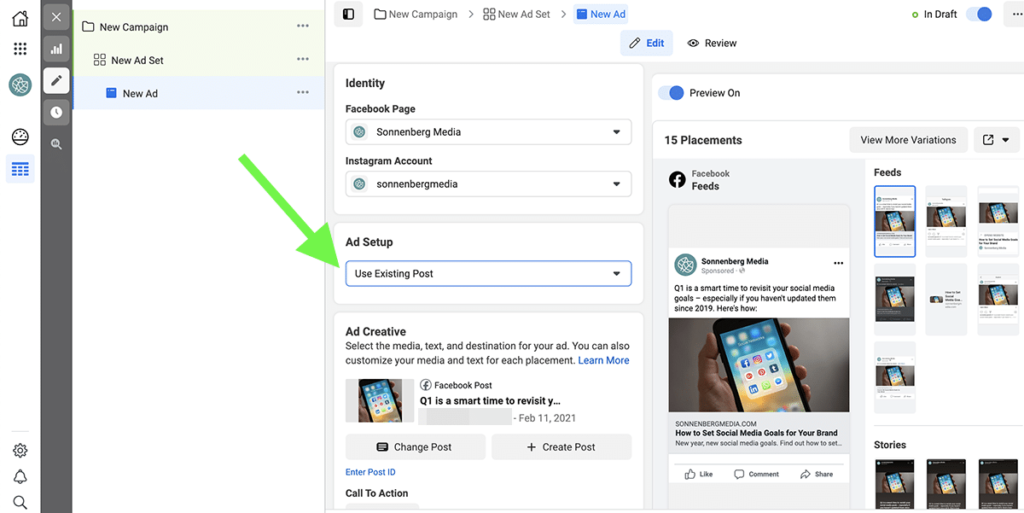
Credit: www.agorapulse.com
Frequently Asked Questions
How Do I Start With Facebook Ads?
To start with Facebook Ads, navigate to Facebook Ads Manager. Create an account if you don’t have one. Follow the step-by-step setup process provided.
What Budget Should I Set For Facebook Ads?
Your budget depends on your goals. Start small, around $5-$10 per day. Adjust based on performance and results.
How To Target The Right Audience On Facebook?
Use Facebook’s audience targeting tools. Define demographics, interests, and behaviors. Narrow down to reach your ideal customers.
What Ad Formats Are Available On Facebook?
Facebook offers various ad formats, including image, video, carousel, slideshow, and collection ads. Choose based on your campaign goals.
Conclusion
Setting up Facebook ads doesn’t have to be complicated. Follow these steps to reach your target audience effectively. By optimizing your ads, you can drive more engagement and conversions. Remember to monitor performance regularly. With consistent effort, Facebook ads can significantly boost your business growth.
Start today and see the results!