
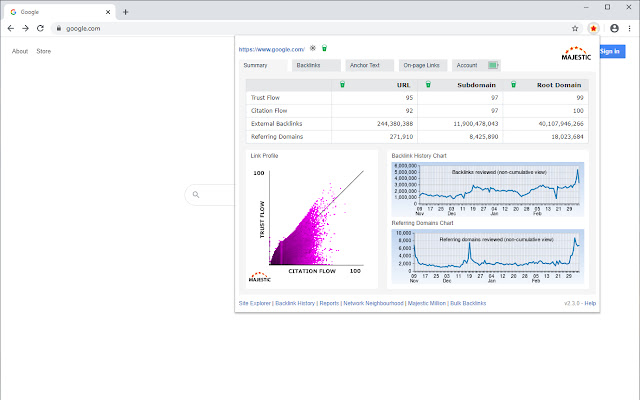
Majestic Backlink Analyzer is a tool that analyzes a website’s backlinks for SEO purposes. It provides detailed metrics on link quality and site authority.
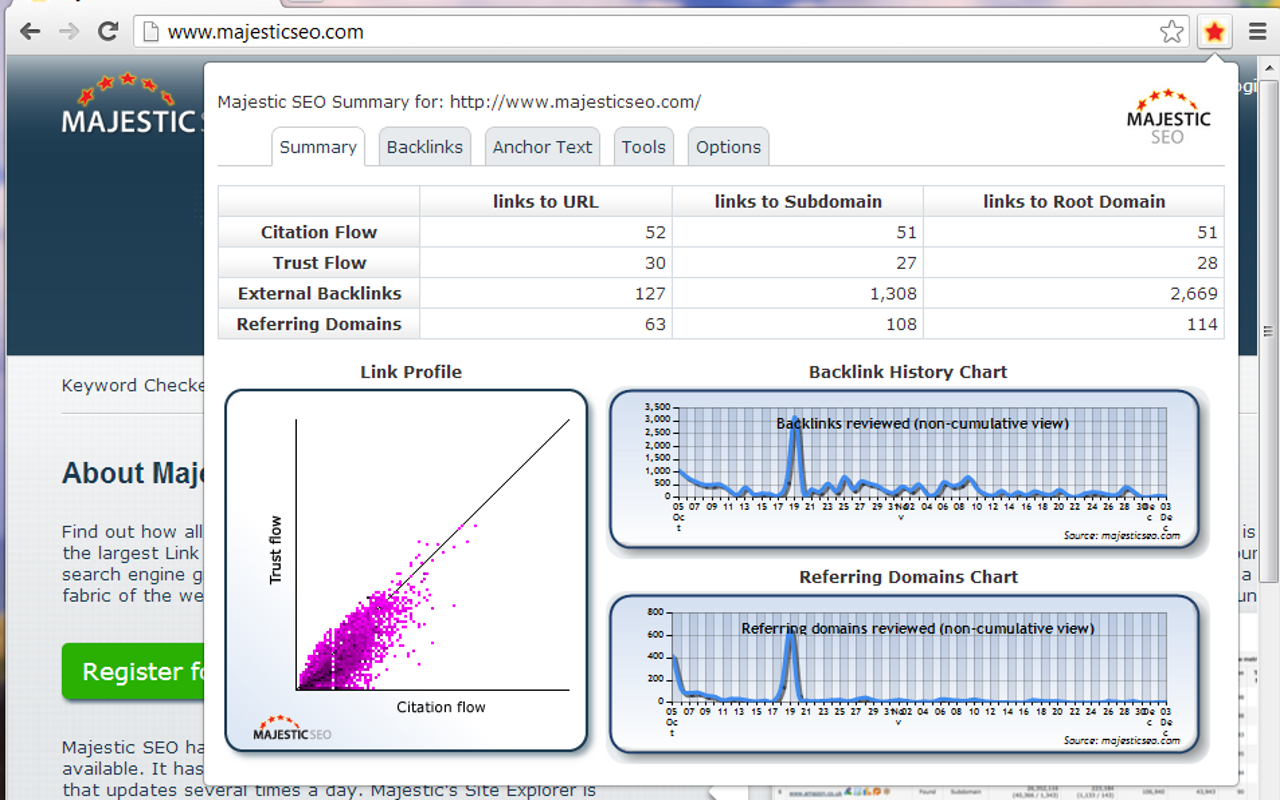
Backlinks are crucial for SEO success. Majestic Backlink Analyzer helps you understand your website’s backlink profile. It offers metrics like Trust Flow and Citation Flow, which gauge the quality and influence of your links. This tool also shows the number of referring domains and backlinks, allowing for a comprehensive analysis.
You can identify strong backlinks and spot harmful ones that might hurt your SEO efforts. With its user-friendly interface, even beginners can navigate through the features. Majestic Backlink Analyzer is essential for anyone looking to boost their site’s search engine ranking efficiently.

Credit: majestic.com
Introduction To Majestic Backlink Analyzer
Majestic Backlink Analyzer is a powerful SEO tool. It helps you examine your website’s backlinks. Understanding backlinks is essential for effective SEO strategies.
What Is Majestic?
Majestic is a leading SEO tool specializing in backlink analysis. It provides detailed insights about your website’s link profile. You can track the quality and quantity of backlinks. Majestic’s data helps in improving your site’s search engine ranking.
Importance Of Backlink Analysis
Backlink analysis is crucial for any SEO strategy. Here are some reasons why:
- Identify Quality Links: Determine which backlinks boost your site’s authority.
- Monitor Competitors: Analyze competitor backlinks to improve your strategy.
- Detect Spam Links: Spot and remove harmful backlinks.
- Track Progress: Measure the impact of your link-building efforts.
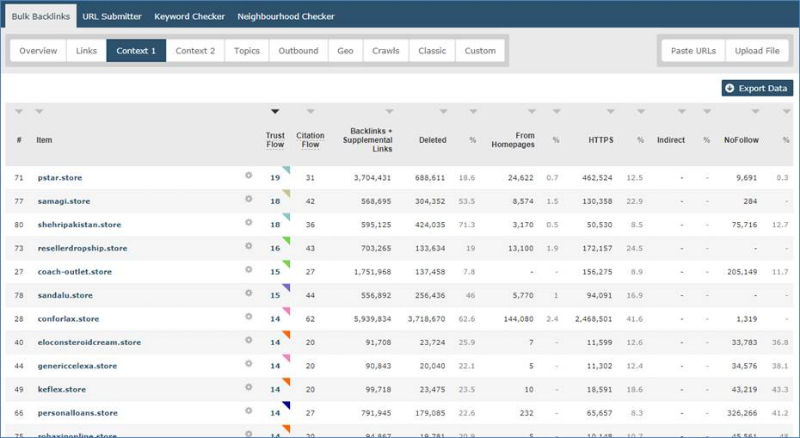
Majestic provides comprehensive backlink data. You can access metrics like Trust Flow and Citation Flow. These metrics help in assessing link quality.
| Metric | Description |
|---|---|
| Trust Flow | A measure of link trustworthiness. |
| Citation Flow | A measure of link quantity. |
Using Majestic, you can improve your backlink profile. Better backlinks lead to higher search engine rankings. Strong backlinks are key to SEO success.
Key Features
Discover the key features of the Majestic Backlink Analyzer. This tool is essential for anyone aiming to optimize their website’s backlink strategy. Below are some of the standout features that make it a must-have.
Trust Flow And Citation Flow
The Trust Flow metric measures the quality of backlinks. It evaluates the trustworthiness of the sites that link to yours. A higher Trust Flow indicates more reliable links.
Citation Flow focuses on the quantity of backlinks. It measures how influential a URL might be based on its link quantity. Together, these metrics provide a complete overview of your backlink profile.
| Metric | Description |
|---|---|
| Trust Flow | Measures quality of backlinks |
| Citation Flow | Measures quantity of backlinks |
Backlink History Checker
The Backlink History Checker offers insights into your backlink growth over time. It helps you understand the trends in your backlink profile. You can spot any sudden changes or spikes in backlinks.
By analyzing this data, you can identify successful strategies. It also helps you pinpoint areas needing improvement.
- Track backlink growth
- Identify trends and patterns
- Spot sudden changes in backlink profile
Setting Up Your Account
Setting up your account on Majestic Backlink Analyzer is simple and quick. This guide will help you create an account and navigate the dashboard. Follow these steps to get started efficiently.
Creating An Account
To begin, visit the Majestic Backlink Analyzer website. Click on the Sign Up button. You will need to provide basic information.
- Email Address: Enter your active email address.
- Password: Choose a strong password for security.
- Username: Pick a unique username.
After filling out the form, click on the Create Account button. Check your email for a confirmation link. Click on this link to verify your account. Now, you are ready to log in.
Navigating The Dashboard
Once logged in, you will see the dashboard. The dashboard is user-friendly and has several sections:
| Section | Description |
|---|---|
| Overview | Shows a summary of your backlink profile. |
| Referring Domains | Lists all domains that link to your site. |
| Backlinks | Displays individual backlinks pointing to your site. |
| Anchor Text | Shows the text used in backlinks to your site. |
Use the Search Bar at the top to find specific data. The left sidebar helps you navigate different sections. If you need help, click on the Help icon.
Regularly check your dashboard to monitor your backlinks. This will help you improve your SEO strategy.
Analyzing Your Backlinks
Understanding your backlinks is vital for improving your website’s SEO. The Majestic Backlink Analyzer is a powerful tool to help you. It provides in-depth insights into your backlink profile. This section will guide you through running a backlink report and interpreting the results.
Running A Backlink Report
To start, log in to your Majestic account. Navigate to the “Site Explorer” tool. Enter your website URL in the search bar. Click “Search.” Majestic will generate a comprehensive report.
| Step | Action |
|---|---|
| 1 | Log in to Majestic. |
| 2 | Go to “Site Explorer.” |
| 3 | Enter your URL. |
| 4 | Click “Search.” |
Interpreting The Results
Once the report is ready, you’ll see several metrics. Focus on the following key metrics:
- Referring Domains: Number of unique domains linking to your site.
- Trust Flow: Quality score based on the trustworthiness of linking sites.
- Citation Flow: Score indicating the link volume pointing to your site.
- Topical Trust Flow: Relevance of your backlinks to your site’s topic.
Analyze the Referring Domains. More unique domains usually indicate a stronger backlink profile.
Check the Trust Flow. Higher scores suggest more trustworthy backlinks.
Look at the Citation Flow. This shows the overall link volume. A balance between Trust Flow and Citation Flow is ideal.
Review the Topical Trust Flow. Ensure your backlinks come from relevant sites.
- Log in and run the report.
- Check the key metrics.
- Analyze each metric for insights.
By understanding these metrics, you can improve your backlink strategy. Use this knowledge to strengthen your website’s SEO.
Competitor Analysis
Understanding your competitors is crucial in digital marketing. The Majestic Backlink Analyzer can help you outshine them. This tool offers deep insights into your competitor’s backlink strategy. Let’s explore how to conduct effective competitor analysis using this powerful tool.
Identifying Competitors
First, you need to identify your main competitors. These are businesses targeting the same audience. They offer similar products or services. You can find them by:
- Searching for industry keywords on Google
- Analyzing social media mentions
- Using tools like Majestic’s Site Explorer
Once identified, list your top 5-10 competitors. This list will guide your analysis.
Comparing Backlink Profiles
Next, compare your backlink profile with your competitors. This step reveals their strengths and weaknesses.
Use the Majestic Backlink Analyzer to gather data. Here’s how:
- Enter your competitor’s URL into the tool
- Review the total number of backlinks
- Analyze the referring domains
- Check the backlink quality and trust flow
Record this data in a table for easy comparison:
| Metric | Your Site | Competitor 1 | Competitor 2 |
|---|---|---|---|
| Total Backlinks | 1000 | 1500 | 1200 |
| Referring Domains | 300 | 450 | 400 |
| Trust Flow | 20 | 25 | 22 |
This comparison highlights areas for improvement. You can target high-quality backlinks. You can also focus on increasing your trust flow.
Improving Your Backlink Profile
Improving your backlink profile is crucial for SEO. A strong backlink profile helps your site rank higher. Majestic Backlink Analyzer is a powerful tool for this purpose.
Building High-quality Links
High-quality links are vital for a strong backlink profile. Focus on links from authoritative sites. These links carry more weight and boost your rankings.
- Reach out to relevant websites.
- Guest post on high-authority blogs.
- Engage in niche forums and communities.
- Share valuable content to attract links naturally.
Disavowing Toxic Links
Toxic links harm your site’s reputation. Identify and disavow these links using Majestic Backlink Analyzer. This tool helps you spot harmful backlinks quickly.
- Download your backlink profile from Majestic.
- Analyze the links for spammy or irrelevant sites.
- Create a disavow file with these toxic links.
- Submit the disavow file to Google Search Console.
Regularly monitor your backlink profile. Ensure only high-quality links point to your site.
Case Studies
The Majestic Backlink Analyzer is a powerful tool for tracking backlinks. Its case studies provide insights into successful strategies and lessons learned. These real-world examples highlight the effectiveness of the tool in improving SEO performance.
Successful Backlink Strategies
One case study involved a local bakery. They used the Majestic Backlink Analyzer to identify high-quality backlinks. They focused on engaging with local food bloggers. This strategy increased their website traffic by 30% within three months.
Another case involved a tech startup. They needed to build authority quickly. By analyzing competitors’ backlinks, they targeted similar sources. This helped them acquire 50 new backlinks in just two months.
Lessons Learned
From these case studies, several lessons emerge. First, targeting relevant and high-quality backlinks is crucial. Engaging with niche influencers can yield significant results.
Second, continuously monitoring your backlink profile is essential. This helps in identifying and disavowing low-quality links. It also ensures that your backlink strategy remains effective.
Finally, competitor analysis can provide valuable insights. By understanding where competitors get their backlinks, you can replicate their success. This helps in building a robust backlink profile quickly.
Below is a summary table of the key points from the case studies:
| Case Study | Strategy | Result |
|---|---|---|
| Local Bakery | Engaged with local food bloggers | 30% traffic increase in 3 months |
| Tech Startup | Analyzed competitors’ backlinks | 50 new backlinks in 2 months |
Credit: blog.majestic.com
Credit: blog.majestic.com
Frequently Asked Questions
What Is Majestic Backlink Analyzer?
Majestic Backlink Analyzer is a tool that evaluates the quality and quantity of backlinks to a website. It helps in understanding a site’s link profile, including trust flow and citation flow metrics.
How Does Majestic Backlink Analyzer Work?
Majestic Backlink Analyzer works by crawling the web and collecting data on backlinks. It then analyzes this data to provide insights into link quality and relevance, helping improve SEO strategies.
Why Use Majestic Backlink Analyzer?
Using Majestic Backlink Analyzer helps identify valuable backlinks and potential link-building opportunities. It also aids in monitoring competitors’ backlinks and improving overall SEO performance.
Is Majestic Backlink Analyzer Accurate?
Yes, Majestic Backlink Analyzer is known for its accuracy. It uses a vast database and advanced algorithms to provide reliable backlink data, making it a trusted tool among SEO professionals.
Conclusion
Mastering the Majestic Backlink Analyzer can boost your website’s SEO performance. By tracking backlinks, you can enhance site authority. This tool is essential for any serious digital marketer. Start leveraging its features today to stay ahead of the competition. Improve your SEO strategy and watch your site traffic grow.


